

WordPress is perhaps one of the most featured rich CMS (Content Managing System), together with the wide varieties of plugins. It is perhaps one of the most complete systems in the blogging world, not to mention the best.
See More ▼ FREE Top WordPress Web Hosting Server with MySQL and PHP
Migrating to the WordPress platform from Google Blogger or Tumblr is easy with the WordPress import system. We’ve created a simple step by step tutorial on how to export your post, comments, tags and other data.

Note: Most shared web hosting has a maximum upload file size of 2MB, if you’re experiencing this problem on a shared hosting, try contacting your web hosting company and have them manually upload the files.
Automatically Import Blogspot to WordPress
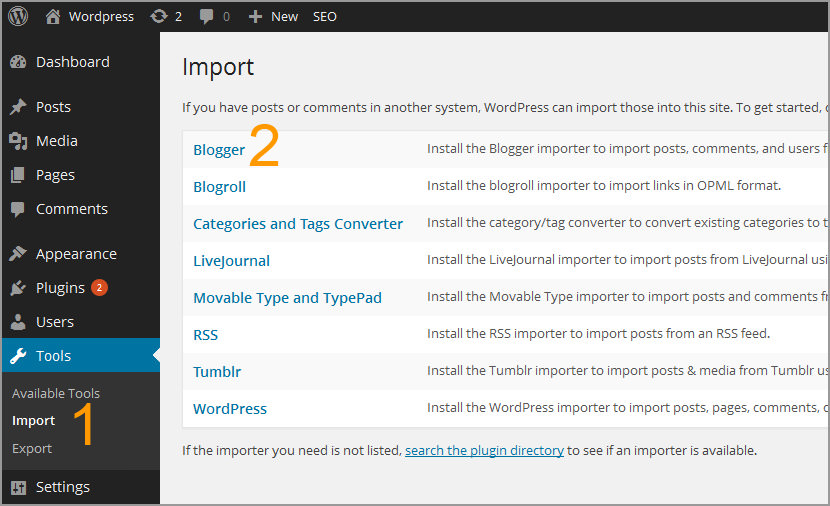
Step 1 – Under WordPress, select ‘Import’
Step 2 – Choose ‘Blogger’ or ‘Tumblr’ file to import
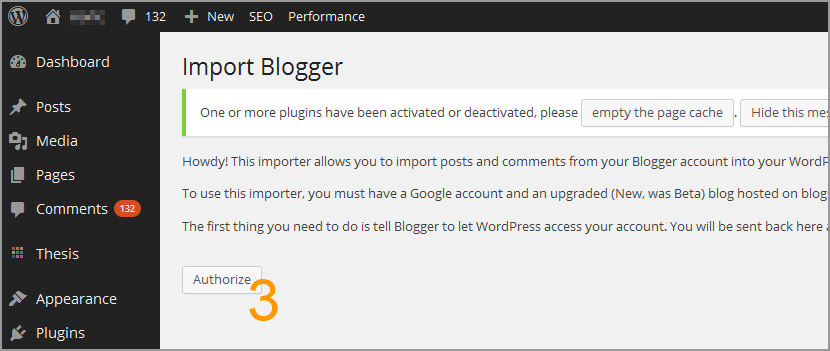
Step 3 – Once installed, click on ‘Activate Plugin & Run Importer’
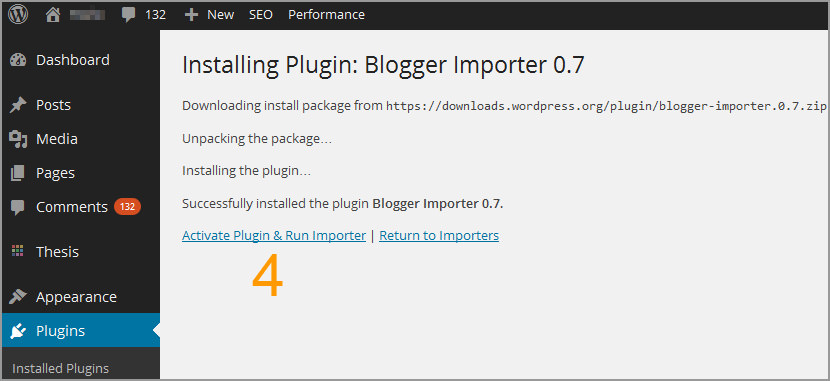
Step 4 – Click on the ‘Authorize’ button
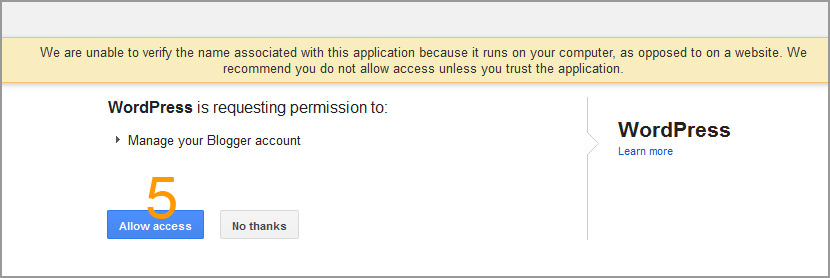
Step 5 – You’ll be redirected to Google Account, choose ‘Allow Access’ in Blogger
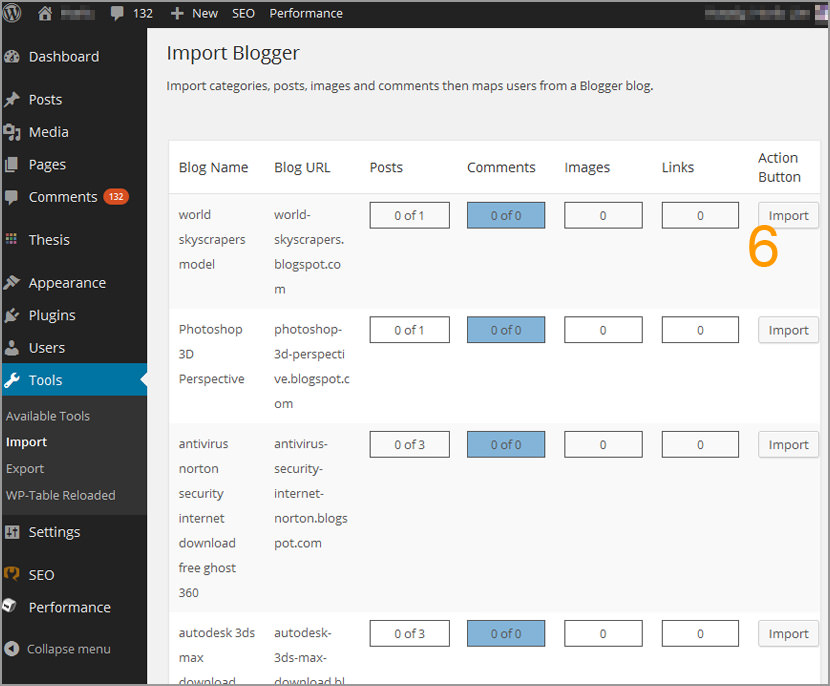
Step 6 – You’ll be redirected back to WordPress again, now to ‘Import’ to import your blog
Tumblr
Tumblr has no export feature. However, you can import its RSS feed, or try one of the migration tools below.
- Tumblr2wp Tumblr Importer Creates a WXR (WordPress eXtended RSS) file from your tumblr site which can be imported into WordPress.
Tumblr2wordpress.comCreates an XML with all the content, comments, tags and files that can be imported into WordPress. Not suitable for WordPress 3.0 or above.
When you’ve finished creating and downloading the WXR file, follow Step 6, 7 and 8 to import tumblr’s post into WordPress.
Google SEO and WordPress Permalink
When you’re done importing your articles to WordPress from Blogger, the only problem left is redirecting article A in Blogger to article A in WordPress. Here are 2 simple steps required, follow the simple step by step tutorial as shown below. In WordPress themes folder, look for the file function.php, copy and paste the following code into the file:
<?php

function geckoandfly_blogger_query_vars_filter( $vars ) {
$vars[] = "blogger";
return $vars;
}

add_filter('query_vars', 'geckoandfly_blogger_query_vars_filter');

function geckoandfly_blogger_template_redirect() {
global $wp_query;
$blogger = $wp_query->query_vars['blogger'];
if ( isset ( $blogger ) ) {
wp_redirect( geckoandfly_get_wordpress_url ( $blogger ) , 301 );
exit;
}
}

add_action( 'template_redirect', 'geckoandfly_blogger_template_redirect' );

function geckoandfly_get_wordpress_url($blogger_slug) {
global $wpdb;
if ( preg_match('@^(?:https?://)?([^/]+)(.*)@i', $blogger_slug, $matches) ) {
$q = "SELECT guid FROM $wpdb->posts LEFT JOIN $wpdb->postmeta
ON ($wpdb->posts.ID = $wpdb->postmeta.post_id)
WHERE $wpdb->postmeta.meta_key='blogger_permalink'
AND $wpdb->postmeta.meta_value='$matches[2]'";
$wp_url = $wpdb->get_var($q);
}
return $wp_url ? $wp_url : home_url();
}

?>
In Blogger.com, click on the ‘Template’ tab and then scroll down till the end, click on ‘Revert to classic templates’. When you are done, copy and paste the following code into the template editor. Remember to replace WWW.YOUR-URL.COM with your own URL.
<html>
<head>
<title><$BlogPageTitle$></title>
<script>
<MainOrArchivePage>
window.location.href='WWW.YOUR-URL.COM'
</MainOrArchivePage>
<Blogger> <ItemPage>
window.location.href='WWW.YOUR-URL.COM?q=<$BlogItemPermalinkURL$>'
</ItemPage> </Blogger>
</script>
<MainPage>
<link rel="canonical" href="WWW.YOUR-URL.COM" />
</MainPage>
<Blogger><ItemPage>
<link rel="canonical" href="WWW.YOUR-URL.COM?blogger=<$BlogItemPermalinkURL$>" />
</ItemPage></Blogger>
</head>
<body>
<MainOrArchivePage>
<h1><a href="WWW.YOUR-URL.COM"><$BlogTitle$></a></h1>
</MainOrArchivePage>
<Blogger><ItemPage>
<h1>
<a href="http://WWW.YOUR-URL.COM/?blogger=<$BlogItemPermalinkURL$>">
<$BlogItemTitle$>
</a>
</h1>
<$BlogItemBody$>
</ItemPage></Blogger>
</body>
</html>
Congratulations, you’ve successfully migrated from Blogger or Tumblr to WordPress. I assure you WordPress is the best blogging system at the time of writing, there are so many plugins and wonderful features that can not be found in other blogging systems. In short, if you are serious about blogging, WordPress is it.



I am curious to know if it is also possible to do this with a hosted wordpress? I have a friend who might do it if it is that easy. Please inform (with the e-mail address supplied, or I’ll keep checking back.) Thanks.
It’s not as easy it it sounds.. This way you can import the posts but have you ever thought that you are creating two same copy of two posts on Internet.,..
The perfect method is 301 perma rediretion.. I have seen many blogger doing the same mistakes by using the simple import function to migrate form blogspot to wordpress.
And in the end they are left with very less traffic from Google search engines because they get Penalize for duplicate content.,
migrating blog posts is easy but its hard to redirect everything and if anything goes wrong then you will loose everything
Above you mentioned method is for Import and Export only. Please try to clear the redirection method and also protect the traffic as well as PR
A little time back I also migrated my tumbl blog to wp. Since I’m not very computer literate person – I searched for a tool to get the job done without intensive hands-on. My search ended when I found the service. It seamlessly imported blog to wp, and I was blown away by their level of service and professionalism.