

Can I install Norton Antivirus and Kaspersky on my laptop? or can I install Norton and AVG on the same desktop? The answer is no. The reason being that having two or more antivirus software installed on a system will cause Microsoft Windows to be sluggish, this is because both anti-virus will try to out-scan each other.
Traditionally, only a single engine can actively scan a system at a given time. Using multiple engines simultaneously can result in conflicts that lead to system freezes and application failures. However, a number of security applications and application suites have optimized multiple engines to work together.
In short, Symantec Norton Antivirus will scan Avast Antivirus’s processes while Avast tries to scan Norton’s processes this will cause an endless loop of scanning as both will continuously scan each other, thus consuming unnecessary resources by out-scanning each other. Running multiple antivirus is not a wise thing to do, not impossible but unwise. Some people feel safer with 2 antiviruses instead of 1, but they are not aware that installing multiple antiviruses will cause the laptop or computer to freeze randomly, if not, Windows will lag badly.
Hundreds of thousands of malware, trojans, and viruses are released to the world wide web on a daily or hourly basis. Even the best antivirus engines available today can only detect so much from the time new threats are released up to a day, a week, or even a month after. This is where a multi engine antivirus becomes popular with the FBI, CIA, and big corporations, they are the best antivirus protection.
1. CatchPulse (SecureAPlus)
Free 1 Year | 12 Cloud Antivirus Engine

CatchPulse was known as SecureAPlus, it is an universal AV that lets users combine more than 10 antivirus engines in a simple and straightforward solution. This effectively bridges the gaps in between to give users one of the best detection rates from day one to one hundred and beyond. When Universal AV detects threats, it incorporates data from multiple engines and presents them to the user to make an informed decision, instead of immediately deleting a potentially harmless file.
CatchPulse catches threats that traditional antivirus solutions miss. No single anti-virus or even combination of anti-viruses can guarantee 100% detection, 100% of the time. By leveraging the power of the cloud, not only do you get real-time scan results from multiple antivirus engines at a time, but it also lets you save a lot on CPU processes and RAM consumption. Works great on Microsoft Windows 10.
- Universal AV – Use up to 12 Cloud Antivirus Engines for higher detection rates & low false positives
- Application Whitelisting – Prevent untrusted applications from running without your permission
- Offline Protection – Optional local Anti-Virus is included for protection while offline
2. OPSWAT Client
Free | 42 Antivirus Engines
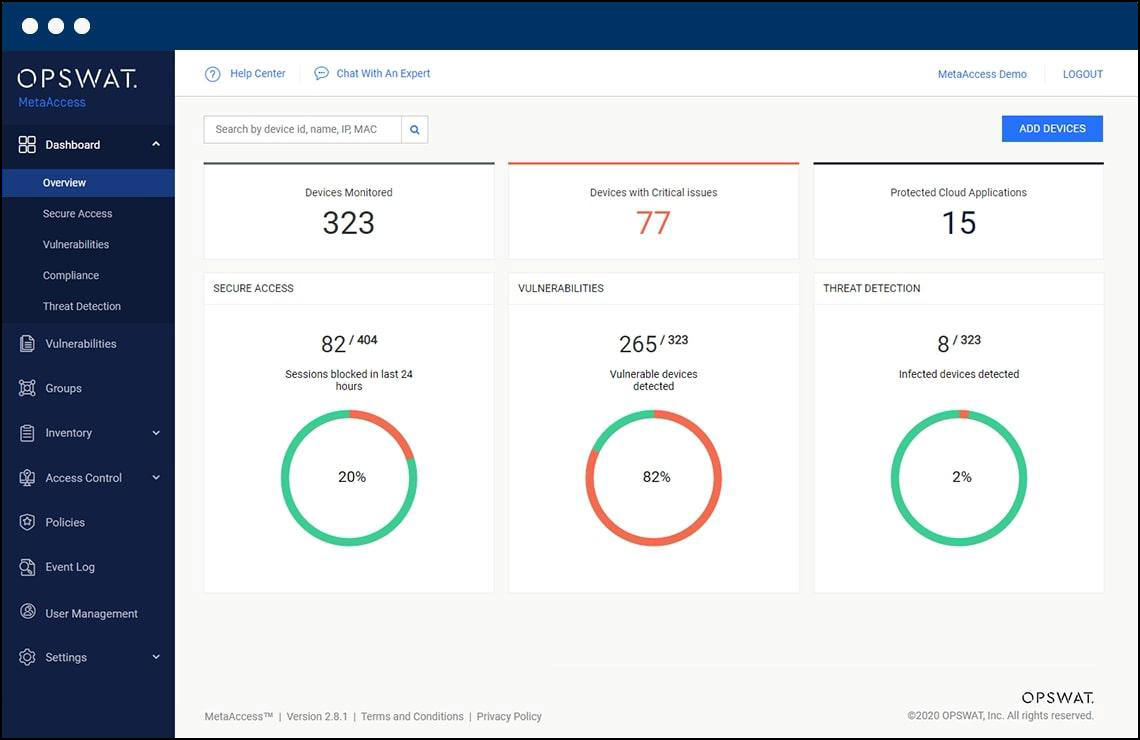
OPSWAT Metadefender combines a configurable number of anti-malware engines (1 to 30) to scan for malware on premise. Also available with 42 engines in the cloud. When you suspect a device may be infected with malware, run Metadefender Cloud Client for the most thorough free malware scan. The tool uses several unique methods to identify malware and give you visibility into the processes your device is running:
- Advanced Threat Prevention – Sanitize risky content on removable media (supporting over 100 common file types) and rebuild each file securely ensuring full usability before being transferred into critical networks.
- Enhanced Threat Detection – Scan unknown content on removable media with 35+ anti-malware engines using signatures, heuristics, and machine learning technology and increase detection rate of known and unknown threats to greater than 99%.
- Enforce Safe Media Usage – Integration with MetaDefender Kiosk allows the OPSWAT Client to enforce the use of the kiosk for removable or portable media. The OPSWAT Client checks each file for kiosk originated digital certification and denies access to any files that have been altered or are not on the authenticated digital manifest.
- File-based Vulnerability Assessment – Detect known vulnerabilities in over 15,000 software applications to minimize the risk of Zero-Day exposure to vulnerable applications of IoT installers before they are brought into the secure network environment and installed.
3. 360 Total Security
Free | 5 Antivirus Engines

Your unified solution for PC security and utility. Qihoo 360 Total Security uses Bitdefender Engine, QVM 2 Engine,360 Cloud engine. But, the Chinese version includes the Avira engine additionally. 360 Total Security is one such application, since it includes an antivirus scanner, a cleanup tool and a startup booster, all wrapped nicely with an intuitive GUI. Multiple Engines Protection
- 360 Cloud Scan Engine
- 360 System Repair Engine
- 360 QVMII AI Engine
- Avira Engine
- Bitdefender Engine
4. HitmanPro
Free 30 Days | 4 Antivirus Engines
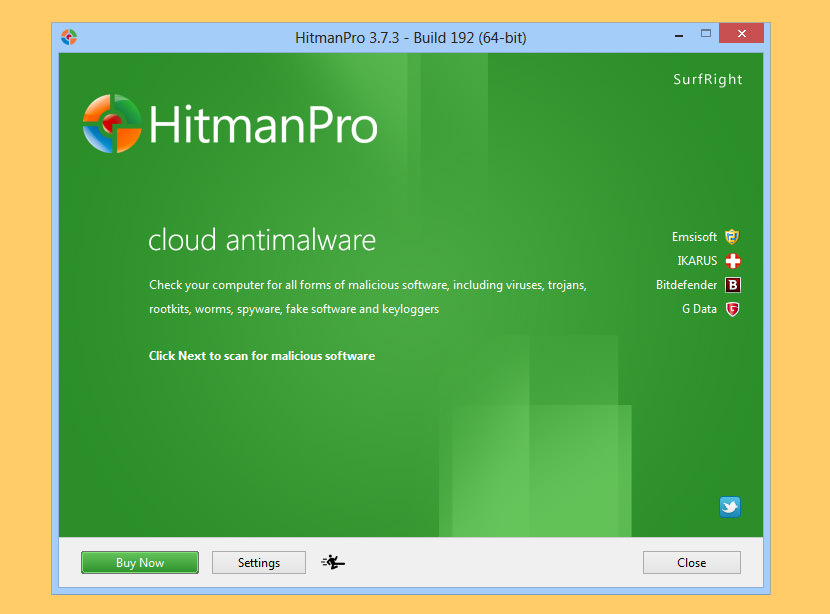
Combines an in-house behavioral engine with a cloud containing engines from Kaspersky Lab and BitDefender. A new host of malware is activated every day and can be found everywhere, even on trusted websites, evading regular antivirus programs. HitmanPro is designed to run alongside your antivirus, using its behavioral deep scanning to find and eliminate zero-day, next-gen malware that has avoided detection.
- Behavioral detections + collective intelligence – Instead of solely relying on product signatures to detect malware, HitmanPro investigates each file’s behavior to determine what acts malicious. This approach gives HitmanPro the ability to stop brand-new and complex malware and viruses before they’ve been identified. HitmanPro also accesses the SophosLabs malware database, allowing for detection of even more forms of malware, while tracking the malware to its source.
- No installation needed – HitmanPro is only 12 MB and requires no installation. It can start directly from a desktop, USB Flash Drive, CD/DVD, or a remote storage device. Even if your antivirus is being manipulated by malware or ransomware is getting a hold of your files, HitmanPro functions normally, detecting and removing the threat.
- Comprehensive remediation – HitmanPro has the ability to remove persistent threats from within your operating system and replaces infected Windows resources with safe, original versions, all while proactively blocking reinfection attempts.
5. herdProtect
Free | 68 Antivirus Engines
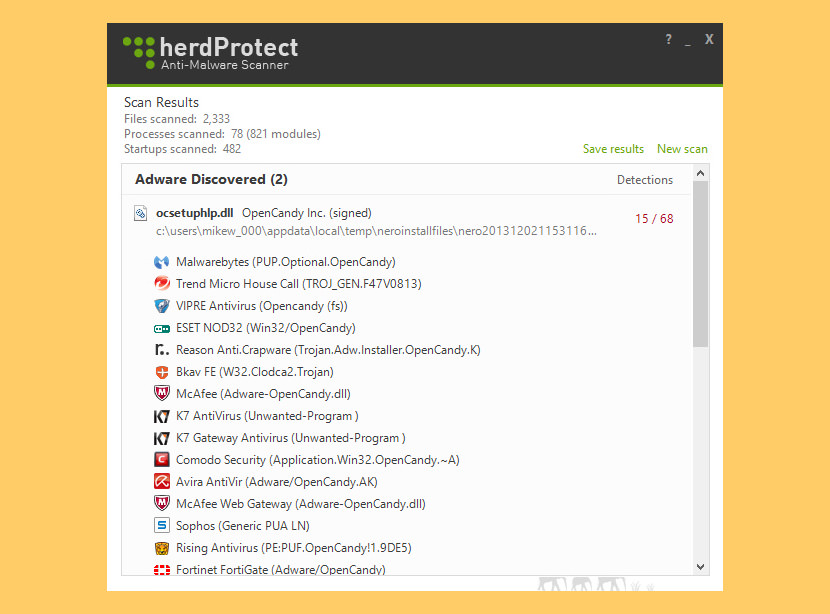
[ Discontinued ] herdProtect Anti-Malware Scanner is a fast and free Windows desktop program which detects malicious threats, spyware and adware by utilizing 68 industry anti-malware scanners. It has no impact on your system resources and uses the herdProtect cloud-based scanning engine. The scanner is a second line of defense and is designed to work perfectly with your existing anti-virus software (we highly recommend you use another anti-malware product with herdProtect).
The scanner works by taking a snapshot of all the ‘active’ files on a user’s PC. They generally define an active file as one that is currently executing on the system or has the ability to automatically execute by means of an auto-start procedure (such as an extension, task, etc.). This snapshot is stripped of any personally identifiable details to make sure that the report is 100% anonymous and securely sent to the herdProtect servers to be analyzed. Upon arriving, the system quickly sorts the files as known or unknown entities. Known entities are then categorized based on the detections that were discovered when scanned by all 68 anti-malware engines. Engines that Power herdProtect
- Agnitum
- AhnLab V3
- Antiy Labs Antiy-AVL
- Aladdin eSafe
- Avast! Antivirus (ALWIL)
- AVG AntiVirus
- Avira AntiVir
- Baidu Antivirus
- BitDefender
- Boost (Resason Software)
- BullGuard
- ByteHero
- Quick Heal (Cat Computer Services)
- Command Antivirus (Commtouch)
- ClamAV (ClamAV)
- Comodo
- DrWeb (Doctor Web, Ltd.)
- Emsisoft (Emsi Software)
- ESET NOD32 (Eset Software)
- ESTsoft ALYac
- Fortinet
- F-Pro (FRISK Software)
- F-Secure
- GData (G DATA Software)
- The Hacker (Hacksoft)
- herdProtect [Fuzzy]
- IKARUS anti.virus
- nProtect (INCA Internet)
- Jiangmin
- K7 Antivirus (K7 Computing)
- K7 Gateway Antivirus (K7 Computing)
- Kaspersky
- Kaspersky Endpoint (Security 10 for Windows)
- Lavasoft Ad-aware
- Malwarebytes Anti-malware
- Microsoft Forefront
- Microsoft Security Essentials
- Microsoft Windows Defender
- mSecure Antivirus
- Nano Antivirus
- Norman Antivirus
- Optenet
- Panda Platinum (Panda Security)
- Preventon (Security Software)
- Qihoo 360 Internet Security (Qihoo)
- Roboscan
- Rising Antivirus
- Sophos SAV
- SUPERAntiSpyware
- System Shield (iolo)
- Tencent Antivirus
- TotalDefense
- Trend Micro
- Trend Micro HouseCall
- TrustPort
- Twister Antivirus (Filseclab)
- Vexx Guard AntiVirus
- ViRobot (Hauri)
- VirusBlokAda VBA32
- VIPRE Antivirus (ThreatTrack Securit/Sunbelt/GFI)
- VIRUSfighter Plus (SPAMfighter)
- ZoneAlarm
- Zoner AntiVirus (Check Point)



All the antiviruses listed here are very good except for one or two. The antivirus that come for free is not up to the mark.
Useful information mentioned above for the people who are working digitally and need to keep safe their valuable data and systems. But who works as a professional like in offices or they’re for own professional so I suggest them to use a paid antivirus because it has a lot of features like, it protects from malicious software, malware, etc.
Anti-Malware software is computer software used to prevent, detect and remove malicious software. Antivirus software development is very important because threating is increasing day by day, cybercrime is increasing day by day. Nowadays it becomes almost impossible to keep safe our data without an antivirus. Though an antivirus can not protect us 100% from malware, adware and malicious program instead of that it has become necessary to use the antivirus tool.
Free antivirus with multiples engines was never a success before. But, now its really time to switch to antivirus with multiple engines. As now we all uses antivirus in our phone or other devices to keep data safely, in general or be in professional sector, so their is a huge need for protection. Thus, this kind of antivirus is really going to work for it.
herdProtect Anti-Malware Scanner is outdated no longer works on the same website they say it when trying to download it.
as officially reported (from the official HerdProtect website): “We are currently not distributing herdProtect at this time, if you would like to be placed on the waiting list, please email us. We are looking to re-release the software in the coming weeks.” … does anyone have news or news about this antivirus?
Thanks for sharing such a useful information but i find something relevant product and that product is A2Z Defender
Your April 2022 update is still in need of updating.
1) SecureAPlus recently rebranded/redesigned as CatchPulse with a few engines.
2) HitmanPro has been owned for years by SurfRight — which has been owned almost as long by Sophos. Per hitmanpro.com (Feb. 2023), “HitmanPro leverages malware databases from four security labs, including SophosLabs…” Title says 3; outdated (2013?) screenshot shows 4; text mentions 2 (conflicting with picture (4-3+1=2), but also accurate about a decade ago); no mention of Sophos anywhere.
3) VirScan.org is an Asian site offering online file metascans similar to VirusTotal or OPSWAT MetaDefender.
4) VirusTotal and MetaDefender have browser extensions that can automatically/manually submit downloads for analysis. VT and MD also do URL/Domain/IP reputation checks (as do URLvoid/IPvoid and other sites).
PS – Thanks for including a real last content update date. Many sites don’t bother or substitute a recent non-original-content change date just to boost SEO.