

Category: The Web » Tutorials, Optimization, and SEO

Related Article 😍💰👉 6 FeedBurner Alternatives – RSS Feed Newsletter For Bloggers
Method 01 – Turn Off
It appears that blogspot users can now turn off the navbar without going against Blogger Terms and Conditions. As shown in the screenshot above, click on ‘edit’ and then select ‘off’ to turn off the navbar.
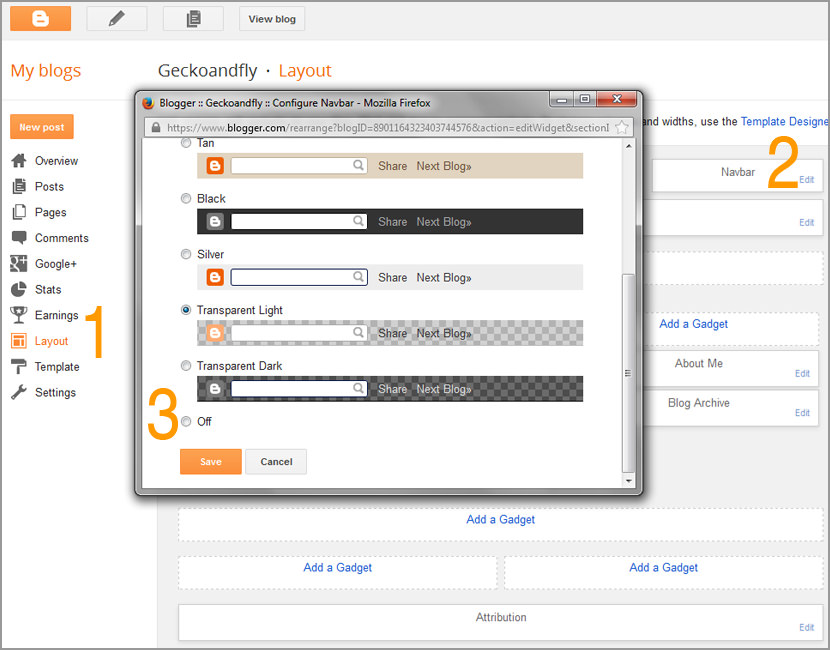
Please note that according to the term and condition of blogger.com, you’re not allowed to remove or disable the navbar from your blogspot template unless you host your blog under your own server. This tutorial is meant for those that host their blog outside of blogger.com, but the code does work for blogs hosted with blogger.com.
Method 02 – Remove Widget
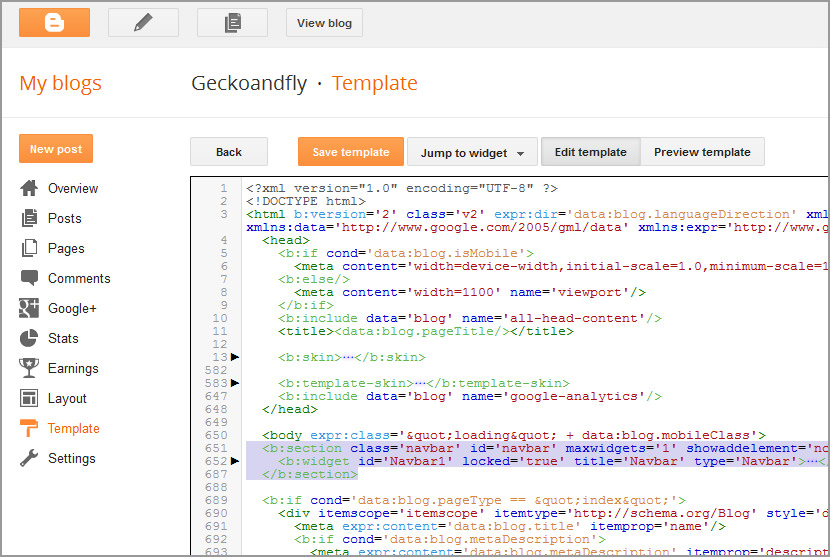
Remove the Navbar widget code, look for the following code and remove it.
Method 03 (Outdated Method)
Copy and paste the code provided below (as shown in the image below) and insert it into the template, the code can be inserted anywhere in the template.
#navbar {
      height: 0px;
      visibility: hidden;
      display: none;
}


Is this allowed if you use blogger, but have .co.nr as your domain name? Write back please
Thanks for the excellent info…
Wow.. It works.. Thanks for the nifty info…
Thanks alot this works very well, compared to the other ones i found…
Is it valuation of Blogger’s TOS ?… will Blogger remove my account?
I found this “Unless you publish your blog via FTP, the Navbar cannot be disabled.”
but I don’t know if that means they just don’t offer you a nice little button option to remove it or if it means you are not allowed to remove it.
I have found nothing that clearly states whether it is allowed or not.
hey thsi totally works!
Thank you so much!
I don’t mind hosting my blog via FTP except that Blogger doesnt support XML templates if I host it.
Is this likely to change any time soon?
this is not the good syntax.
good one :
#navbar-iframe {
height:0px;
visibility:hidden;
display:none
}
Dear Fred,
I tried many scripts on my blog but all are failed and now finally i got that one from you.
Thank You……………..u Buddy
In case anyone is interested in whether or not hiding the blogger navbar is a violation of the Blogger TOS, it isn’t. See the following post with an explanation by a Blogger employee
@ MacGregor
You know, the blogger employee responded with an answer vague enough to cast a lot of doubts about their policy. IOW, read between the friggin’ lines people. They won’t *ban* your site if you remove the navbar, but they recommend you don’t do it *wink*
Check to see if you’re blog has been crawled lately after removing it.
Thank you sooooo much! Your solution works perfectly!
would they take down my blog?
If you own your own domain, they can’t. Coz you’re allowed to do so.
thanks for the share has “delete blog”. Most blogs so confused. in care but still mending but at many wild ni all aliases NEVER post on hohohohoh
nice post. hi. and happy blogging …
Hey ! you ‘re a genius. it works,this is what i have been brainstorming personally over the years.Thanks Bro.
i am tried this method …but not working…My blog redirect to co.nr , that’s may reason ????
please help me…
@Faisu.Trust me you have to follow this steps that works for me,sign in to your Blogger Dashboard -> Layout -> Edit -> Html, Then copy this code,
#navbar-iframe {
height:0px;
visibility:hidden;
display:none
}
—————————————————————————————————
Paste it anywhere in the Template code,period.
Refresh to view your new blogspot fresh look and you ‘re Done.
Thanks.. This is the most easy to hide a blogger nav bar…
Thanks for this! I didn’t like that navbar at the top of my site. It looks ugly, but this easy fix hid it from view.
It is technically not legal to do this unless you host your blog off of blogger, but you can still do it. Nobody cares.
thank for tutor…
is it true hide navbar blogspot google violate the rules? if so I hesitated to hide it
Hide navbar
Is this acceptable with google??
If you own your own hosting or domain name , I believe this is acceptable.
thank you its working..
Thanks a lot Brother. I’m success!
Very useful info…by using this method I remove the navbar
works perfectly but you need to add this code into the advance options under CSS
Thanks! I found I had to make sure the code was in the CSS portion of my header. Anywhere else and it didn’t work. Otherwise, great – and good knowing a blogger employee gave the unofficial Okay.
it is just recently that i knew that it’s possible to remove this navbar, my blogs were just bad and so, for long time. In my opinion it’s always a better option to remove the blogger navbar because when it’s not done, the blog just looks like a novice blog. Thanks so much for the trick!
Thanks for sharing…. Done it already with an easy step…
Thanks a lot. I have used this trick in my blog and it is working superbly.
If they allowed us to fully costumize html…that means they allowed to remove navbar…it’s simple..
I just did it now. Many thanks!
thanks a lot bro
Do google prefer removing blogger navbar?? do my blogger blog will get deleted if i remove navbar??? and also please, removing attribution (footer) is ok??
Thank you so much for this.
I have been trying to remove blogger nav bar since 2 hours. Eventually your post has helped me in doing it.
Thanks.
Thanks, Finnaly get to remove the Nav bar from my blog.
THANK YOU SO MUCH!!
That is a very nice piece of info. Thanks for it.
Thanks.
Thank you so much. I had to get rid of a lot more code to delete it completelt though. Just look for where the navbar section and includables start until where they stop and delete that.
Nice and very simple method to remove navbar.
This is the video tutorial =>
https://www.youtube.com/watch?v=a4fTIuB5Qg4
How to remove the nave bar that appear on the head of the tempelate.
Can you explain to me why I can’t see the navbar for my blog ksletsgetfit.blogspot.com? It’s not turned off and it shows it in the preview. But when I go to my blog, it’s not visible. The source inspection shows it in the html.
It worked on my blog. Thankyouu :)