

Please take note that this article is meant for those that lost their Windows user login password; it is illegal to perform this task on another person’s computer without their knowledge. Please use the following method wisely.
Related Article 😍💰👉 6 Tips To Get 5x Better Wifi Signal And Boost Speed
The tutorials are fairly simple, it does not require an intensive knowledge in computing to go about recovering your lost password.

Method 01 – Ophcrack Windows User Login Password Cracker
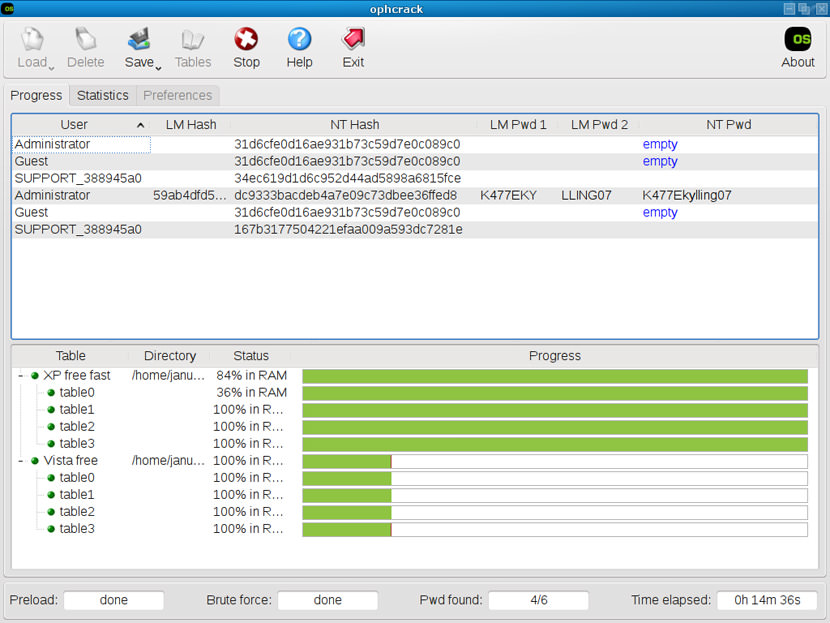
Ophcrack is a Windows password cracker based on a time-memory trade-off using rainbow tables. This is a new variant of Hellman’s original trade-off, with better performance. It recovers 99.9% of alphanumeric passwords in seconds.
What makes ophcrack so powerful is the ability to crack Microsoft Windows user login password with the LiveCD function, no installation needed. LiveCD boots up before Windows does, thus allowing it to load and starts cracking your Windows XP and Vista login password, this bootable feature makes sense because without your password you are completely log out of your own computer.
The only drawback of the cracker is when it comes to cracking passwords with alphanumeric characters more than 15 characters, fear not, the good news is, how many people actually have a 15 character password? Probably that is why you’re reading this post because you have a password that is so long that you’ve somehow forgotten about it, am I right? Anyway the software is free and here are some of the unique features.
- Runs on Windows, Linux and macOS.
- Loads hashes from encrypted SAM recovered from a Windows partition.
- Bootable directly from the CD.
Note that the it only runs on Mac powered by intel processor, older Macs powered by Motorola G5 processor are not compatible.
Method 02 – Administrator Mode
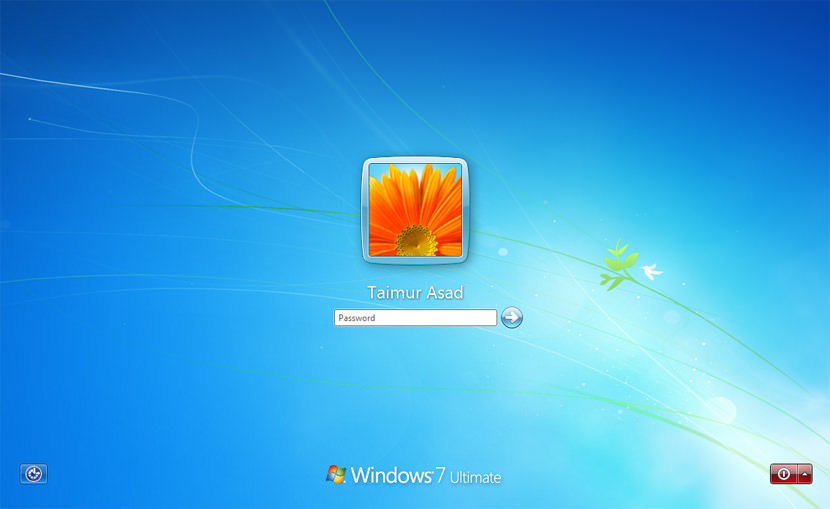
The next scenario: What if you lost your Bios password and you’re not able to change the boot up sequence from Hard Disk to CD-Rom, thus rendering the LiveCD feature useless. Fear not, all Windows comes with the Administrator function, the question is, how do they bring up the administrator login screen?
Simple, hit ‘Ctrl’ + ‘Alt’ + ‘Del’ to bring up the alternative login screen, a new dialog box would popup, what you need to do is key in the user name as ‘administrator’, leave the password field empty and hit ‘enter’. Volla, you’re log into the default administrator user account. Run ophcrack to retrieve your forgotten Windows Login password.
Method 03 – Repair Windows
This method requires the original Microsoft Windows CD, TechTrax has an article ‘Forgot My Administrator Password!’, they provide a step by step tutorial on how to recover your lost Windows XP password.
How to Secure Your Windows Login Password
Prevent people from logging into your computer without your knowledge. Knowing that such a powerful Windows Login Cracker exists, what makes your computer secure? What are the odds of a stranger sneaking in and out of your computer when you’re not around, stealing your data, going through your browsing history without your knowledge?
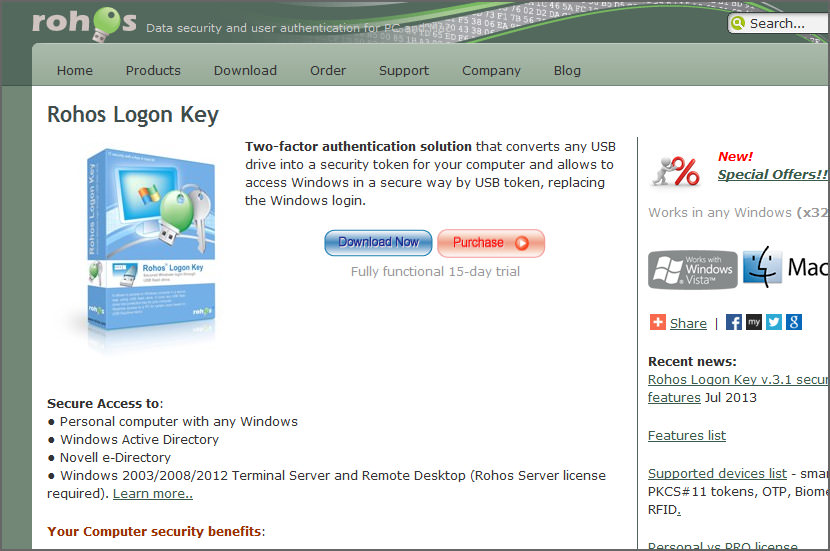
With the availability of these methods as described above, the chances of people sneaking into your ‘secure’ comp is possible. Windows user login password is really weak, what you need is a hardware security lock instead of a software based security, Rohos Logon Key is one of the many hardware security product for windows, it comes in the form of a USB drive, instead of a software based security where you key in your password, it turns your Windows Login requirement into a hardware security token, nobody can access your comp without the exact security USB key, problem is if your lost the USB key, you’re as good as dead.
Rohos Logon Key is considered to be the most convenient, user-friendly and smart password replacement application on the market. This protects your company from information theft.




admin mode is broken on my PC T.T
Thanks! Here is a common method: Reset Windows 7/Vista/xp password with CMD. Key steps:
Step 1: Logon your Windows as administrator(You also can logon Safe Mode with Command Prompt, pressing F8 when restart your computer, hit up/down key to choose Safe Mode with Command Prompt and hit Enter).
Step 2: Click on Start, type cmd in the Run box or Search box and press Enter.
Step 3: Type net user, all user accounts of your computer will be listed.
Step 4: Type net user “UserName” “NewPassword”(replace UerName and NewPassword with yours), press Enter, then the password will be reset as new one and you can logon Windows 7/Vista with it.
Hi, I went to logon to my laptop earleir today (Fujitsu Siemens Amilo) and i can get in!!!! I get an error message saying “incorrect user name or password”
Checked user name…..all ok
checked that my caps were not locked….ok
No-one has access to the machine so the no change of password was applied..ok
Re started and pressed F8, opened in safe mode but I cannot get to the desktop, instead I am back at the login screen.
I am at my wits end!! can anyone out there please shed some light on this rather distressing state of affairs please?
Thanks,
Hi, I went to logon to my laptop earleir today (Fujitsu Siemens Amilo) and i can get in!!!! I get an error message saying “incorrect user name or password”
Checked user name…..all ok
checked that my caps were not locked….ok
No-one has access to the machine so the no change of password was applied..ok
Re started and pressed F8, opened in safe mode but I cannot get to the desktop, instead I am back at the login screen.
I am at my wits end!! can anyone out there please shed some light on this rather distressing state of affairs please?
Thanks,
Why do you try to use the Windows Password Reset? No need to call a technician, no need to re-install anything, and you certainly don’t need to reformat. The program will enable you to reset the password to “Blank” with no -reformatting or installation. Do all the job for you automatically. It’s worth a try.
1. Login to a computer that can link to Internet. passwordunlock and decompress it on that PC. Note that: there is a .ISO file. Burn the .ISO file to a CD.
2 Get out the newly created CD and insert it to the locked computer.
3 re-booted the locked computer and then followed the process of instructions. Just a few steps, the old password was removed.”’
4 Setting new password:
Step one: Open the “Control Panel”
Step two: Click the “User Account ”
Step three: Select the account you wanna to set a new password.
Step four: Click “changing Account ” and “set up password”, then fill out the form as listed. Click “Create Password”.
Thus, you have a personal login ID and Password, any one has no right to login to your computer with out this info.
I have quite the problem. I will explain in detail.
I’ve been using my Windows XP Pro machine under the default
Administrator account for quite some time. Obviously over time, there
have been many settings changed and stored in the “C:Documents and
SettingsAdministrator” folder.
Today, I created another windows account, with Administrator
priviledges, let’s call it XXXX. When I restarted my computer, the
Windows Welcome/Login screen did not give me the option to login as
the default Administrator. It only allowed me to login as the new
XXXX Administrator account I created. Obviously, this account does
not have any of the settings that I have been working on using the
default Administrator account, making it useless to me at this point.
However, all of those settings are still available in the “C:
Documents and SettingsAdministrator” folder.
How can I restore that account and keep it as my main account? I
cannot login as it, nor can I find it listed in my list of Accounts in
the Control Panel under User Accounts. I know it still exists because
everything is found in the “C:Documents and SettingsAdministrator”
folder, as opposed to the “C:Documents and SettingsXXXX” folder.
I cannot log on back to the Origional Administrator?? which means now i am using Users mode instead of the origional administrator. how can i get back to the origional administrator?? on my log on screen there is only on administrator and the origional admin somehow dispeared?? how do i get my origional admin back?? i am now using the user account mode and i’ve rename it to administrator but actually the real administrator has dispeared!?? i am using win xp pro sp2.
Long time ago , I was confronted with the similar problem. Finally , my friend Jane introduce the Windows password Reset.It help me access windows. It’s worth a try!
i forget my password of my laptop,i use vista os.pls help me
Hey, I also got locked out of my computer several days ago. I tried several free software. It took me two days and got quite messy. Unfortunately none of them work for me. Finally I made it work with password genius. The good news is that it works. The bad news is it is not free.
Forgot windows xp password?Do not be so anxious. I know a tool which can help you bypass windows xp admin password, need not to reinstall the windows OS, its safely and easily.By using “Any Windows Password Recovery 3.0 ” ,could be helpful.
The reference link to windows password recovery software
I think the best way for you is to reset your windows password. The Windows password Recovery Tool 3.0
can solve all your problem within a few minutes. Importantly,No need to call a technician, no need to re-install anything, and you certainly don’t need to reformat.
it also allows you to reset windows password with with USB Flash Drive or cd/dvd Disk now!!
Use windows password recovery software. I personally test a tool named “Windows Login Recovery”. Free download it for official website, burn the .iso file to a blank CD or usb flash drive, insert the CD into the computer and recover the password.
try blank.
here is the methods I know.
The first thing which you check if you forget login password. When we install Windows, it automatically creates an account “Administrator” and sets its password to blank. So if you have forget Your user account password then try this:
Start system and when you See Windows Welcome screen / Login screen, press ctrl+alt+del keys Twice and it’ll show Classic Login box. Now type “Administrator” (without quotes) in Username and leave Password field blank. Now press Enter and you should be able to log in Windows.
Now you can reset your account password from “Control Panel -> User Accounts”.
Same thing can be done using Safe Mode. In Safe Mode Windows will show this in-built Administrator account in Login screen.
Windows XP and further versions also provide another method to recover forgotten Password by using “Reset Disk”. If you created a Password Reset Disk in Past, you can use that disk to reset the password.
just learn from others how to reset windows password with Windows Password Key 8.0
Last month , i lost my windows vista administrator password. I solved my problem with the help of Reset Windows Password 1.3. It not only supports Windows Vista , I have personally tested it with Windows 7 . It worked perfectly to reset any local user account to a blank password. Just an easy to use bootable CD/DVD
We have the same name. I just googled myself and found this comment, which I did not write… I’m sorry my fellow Brett Fairbourn was affected by Windows Vista. :)
Forgot windows password?Lost admin password? Have been locked out of computer?
Lost computer login passwords, which is a common problem for the computer users. So there are many solutions. One of the popular solutions is as following,
1.log on a computer that is linked to internet.
2. Free download windows password Recovery Tool 3.0
3.Burn the downloaded .ISO file onto a blank CD
4.Insert newly created CD into the locked computer and then reboot it
5.select the account you wanna reset the password.
The experience that I forgot windows password happened to me a few weeks ago. My classmate recommend me to take use of Windows Key Finder 1.3 boot CD , which is very smart and just take me a short time to reset a newly password. it’s great!
if you search password Recovery tools in website.
You will found much of Recovery tools, but I think Windows Password Recovery Recovery 6.0 is a good chioce, cheapest and easy to use.
Thanks to you. I think your article will help many people. At one time I forgot my windows password and I create a password recovery disk by a third party program available
How to reset windows password if you have lost admin windows password?Well,it is easy if you have Windows Password Key 8.0 As a system administrator,I’ve tried a couple of these utilities through the years and my favorite is the windows password key 8.0.This utility is used to reset password of any windows versions.
Password Recovery Bundle is a multifunctional tool to recovery many kinds of password.
I have locked out of my computer for a while,and have tried everything i could do but failed.Until I found this great tool Windows Password Key 8.0 as recommend above.It works great,Such a marvellous and useful tool
At one time I forgot windows password. I created a windows password reset disk with a program from and I successfully reset the forgotten password with the disk.
There is an article about how to reset windows password. It must be helpful for those who have been locked out of computer
A few days ago, I had met the headache things that I had forgotten Windows login password. The login screen rejected my passwords. I was frustrated because there was very important data on my disk and I couldn’t reinstall the OS. ………….
However, I fortunately got to know the Reset Windows Password 1.3, which is a professional windows password recovery tool for us to reset windows 7 password instantly yet no data loss.
hi i am having a real problem loging into my windows xp somebody set a pass word on my computer.( my son 11 yrs) so the long and short i can’t log into windows, could anyone help me please?
susan that first method won’ work for windows xp?
susan i was asking if it would work on windows xp?
I have downloaded windows password Recovery Basic. It is a very quick and useful utility for recovering passwords. Just an easy to use bootable CD/DVD . It can also be used on a USB Flash Drive.
There’s a way to reset windows password and it doesn’t involve reformatting and reinstalling Windows. The solution is called Winlogon Password Reset. It can reset almost all Windows passwords in seconds. EVEN support windows 7 password reset tool. you can log in again just in one second.
hii…i have been using window xp sp2 i just have change my password as admin logon. Now i completely slept out my password and could not recover it back.
i have tried to open from safe mode but problem was remain same. what would be plausible solution to recover my lost password?
there is also an account but that account have certain validation ie limited account which does not allow me to change my administrator’s password…..whensoever you got my msg just contact me through following address
(tarunskp@gmail.com)
A Windows Password Reset Disk could do all the job for you, it can reset your lost or forgotten Windows password safely and quickly without login, you can create a Windows password reset disk with the tool Windows Password Breaker, then reset your password.
Forgeot Your Windows Password?
A lot of people think that after having lost their Windows admin password, they absolutely have to reinstall their OS. Let me tell you something: They are wrong!
The program that I recommend is the first one, it is very easy to create a
recovery disk that you can use on any Windows PC.
Windows Password Recovery Software. Reset Administrator Password. XP VISTA 2003 2000 NT.
It’s very easy and safe to reset the forgotten windows password.
You need to prepare:
1:A blank CD/DVD or USB flash drive
2.A computer which can link to internet
3.A program called Windows Password Recovery 6.0
Get started with this 3 simple steps:
Step 1 – Download windows password recovery utility and install it.
Step 2 -Burn your Windows Password Reset CD:
To burn your CD, you’ll need a blank CD-R and the .ISO file of Windows Password Reset.
Step 3 – Put in your newly created CD and remove your Windows password.
Hope it helps.
SMARTKEY Password Recovery Bundle is a must-have toolkit to recover/remove/reset passwords for Windows, Excel, Word, Access, PowerPoint, Outlook, Outlook Express, PDF, RAR/WinRAR, ZIP/WinZIP, MSN, AOL, Google Talk, Paltalk, Trillian, Miranda, Opera, Firefox and IE Browser, etc. Over 21 types of passwords can be Recovered instantly. Until now, these password recovery tools are the fastest on the market, the easiest to use and the least expensive.
Windows Password Key
Saved me today. After many hours of installing and tweaking a brand new PC, something went wrong. I was not able to log into the only Administrator account I had, once the machine had been rebooted.
I burned Windows Password Key to usb, followed the onscreen prompts and in a few minutes was back in the machine.
What a lifesaver!
It will become a permanent part of my toolset for fixing Winndows password problems.
If you lost windows password, you can go into safe mode (F8 when booting up) to recover windows password while you forgot user account password,but if you forgot administrator password,there is no way to change administrator password while you forgot it,you must use software to recover administrator password.my favorite is windows password seeker. passwordseeker.com
Thanks for sharing! Offline NT is free which also can reset Windows password.
If don’t want to change password, I think you can try Asunsoft Windows Password Recovery, it can create new administrator account to Windows system offline.
starwin travels password tell me pls
This means that if you are using a Home edition of Office 2007, you can get an upgrade to Home edition of Office 2020 only and not to the Office 2010 professional edition. Text in PDF is represented by text elements in page content streams. Creating your first website doesn’t have to be a daunting nor expensive task.
Great post. I will be facing a few of these issues as well..
Dear all
i have HP pavilion dv6000 purchase 2007, in Qatar. Formatting sever times my laptop original windows 2007 is became now copy so now i could not update. i have forgotten hp logon id so please how i can update my windows ?
Thank you in advance for solution. my email dataram_dotel at yahoo.com or dataramdotel at gmail.com