

How to send large file attachments via email? The only way to do that is to split these big file into smaller files. The maximum file attachment size for most free email services is 10MB, file size larger than 10MB will be rejected by Gmail, Yahoo Mail, Outlook and Hotmail. Online cloud storage is now the in thing, services such as DropBox makes file transferring and sharing among office peers easier, faster and secure.
Related Article 😍💰👉 7 Free Personal Cloud Backup Storage For Small Business
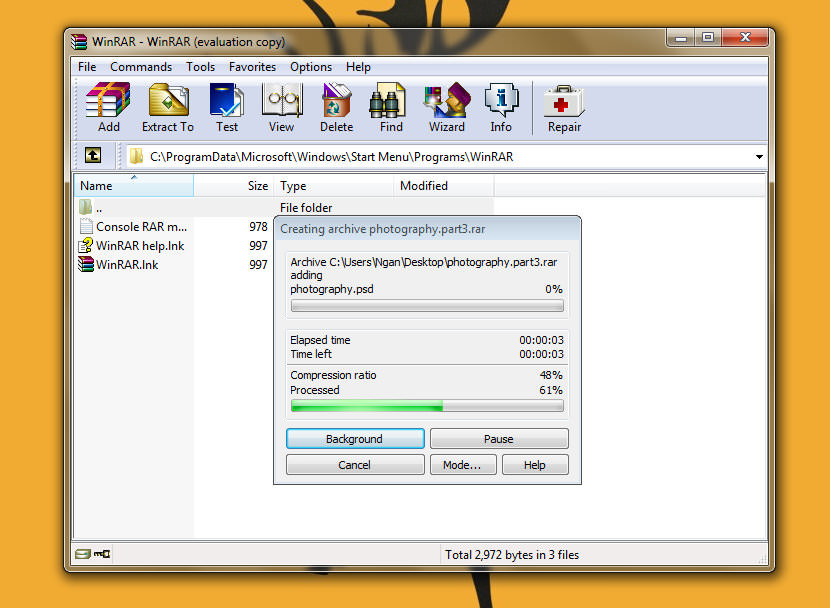
Sometimes sending files over cloud is not an option, for instance the need for a law firm to leave a digital trail to show they’ve received the attachment. Problems arise when the file attachment is larger than 10MB, you will need to split the file to smaller components. WinRAR comes with the ability to split file into smaller files. Without further ado, here are the step by step tutorial:
How to Split Large File into Smaller Files
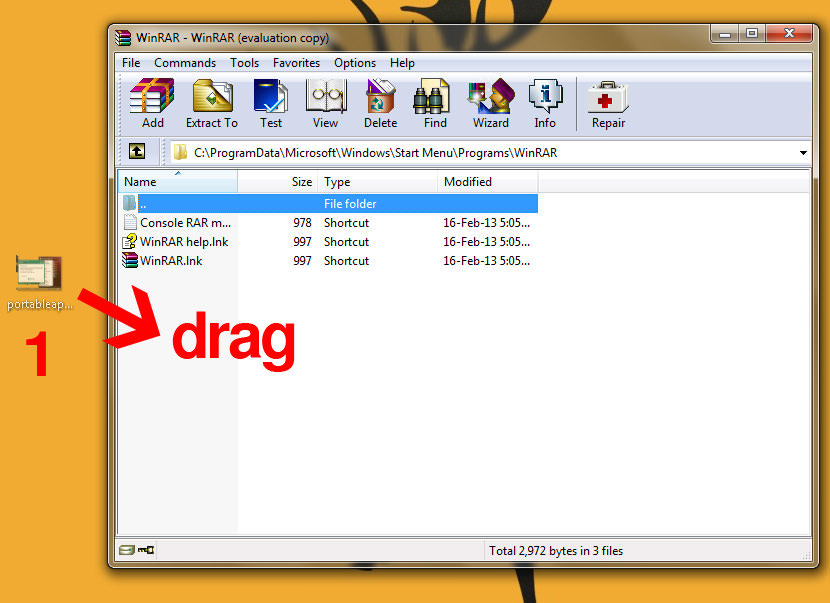
- Step 1 – Launch WinRAR, drag the file into WinRAR.
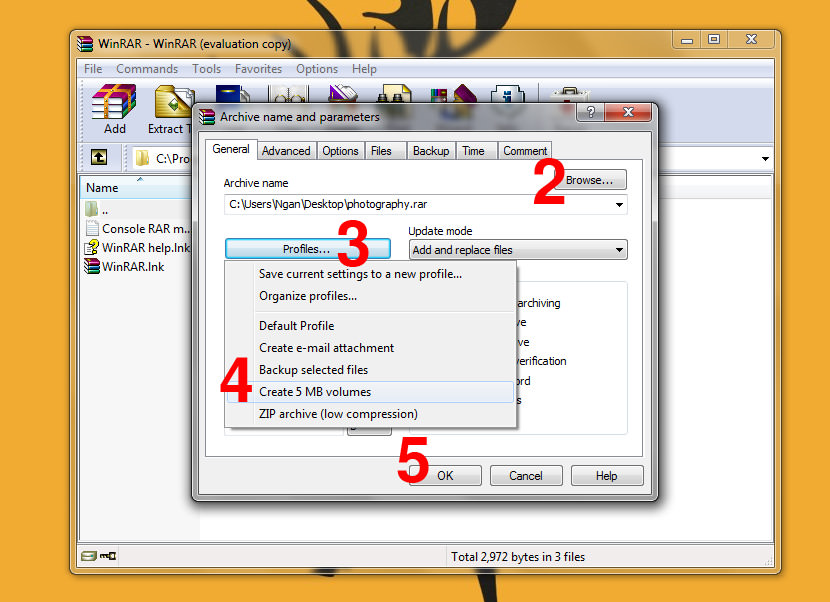
- Step 2 – Click on ‘Browse’, select the location to save the files.
- Step 3 – Click on ‘Profile’ button.
- Step 4 – Select ‘Create 5MB Volumes’.
- Step 5 – Click ‘Ok’ to split the file.
How to Combine Multiple Files
The process is automatic, to combine the files, follow these simple steps:
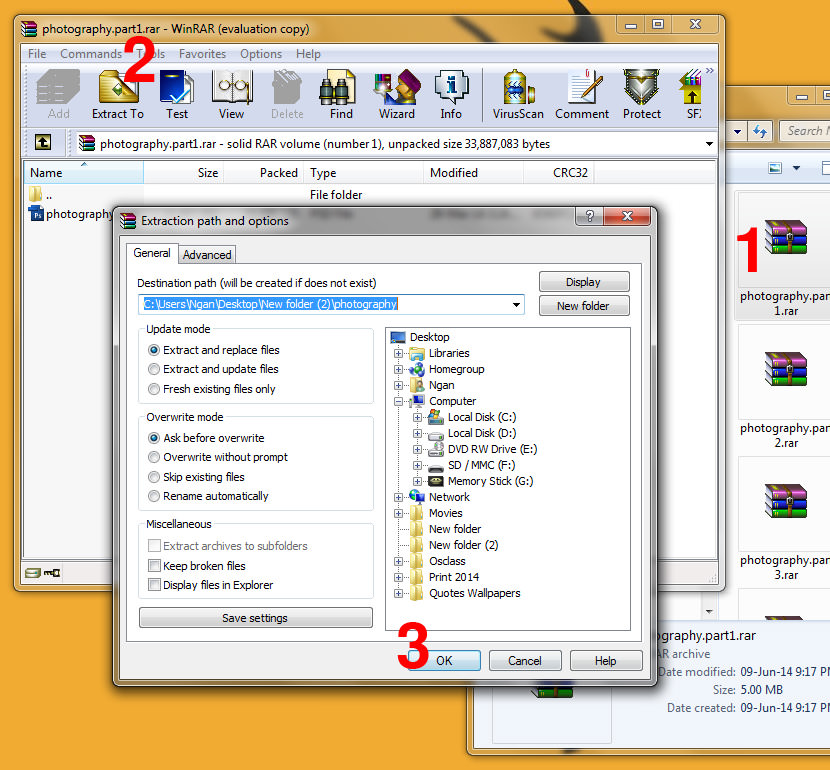
- Step 1 – Double click on any of the files, WinRAR will appear.
- Step 2 – Click on the ‘Extract to’ button.
- Step 3 – Click ‘OK’ to combine, the file will be located within the same directory.
Other Alternative Software and Methods
If using WinRAR to split file for email attachment is not your thing, you can try HJSplit. HJSplit is a popular freeware program to split and recombine files. The program is available on Windows, Linux and a variety of other platforms.
Alternatively, the much more popular WinZip also allows you to create Zip files (.zip or .zipx) that consist of multiple segments of a size you configure. Here is a quick example of how to create a split Zip file:
- Step 1 – Open a folder window
- Step 2 – Find and highlight (select) the files and/or folders you would like to zip
- Step 3 – Right click in the highlighted area
- Step 4 – In the WinZip submenu of the context menu that displays choose Add to Zip file
- Step 5 – If necessary, type a name for the Zip file
- Step 6 – Set the Split Zip file drop down menu to the segment size you would like
- Step 7 – Click Add to create the Split Zip file
Online File Storage and Sharing Services
I do not recommend sharing files via these services, Dropbox is a much more secure service. The following list of file sharing services are not only insecure, the files are made available to the public. Anyone with the link can access the file. Never ever transfer important or personal documents with these services.
- 4Shared | Max file size : 100 MB | File Life : 30 Days
- RapidUpload | File Size : 200MB | File Life : 30 Days
- MegaUpload | File Size : 1024MB | File Life : 21 Days




Good article, on the topic of fast file transfers it’s worth to mention some tools for file transfers over WAN (wide area network). With today’s high speed internet connections, network latency and pocket loss reduce the efficiency of FTP or SFTP. There are file transfer tools on the market that specialize in high performence file transfers for WAN. Tools like FileCatalyst will always guarantee maximum speed regardless of the network condtions.
John
File Apartment is another option –
Up to 1 GB
Safe, secure, and easy
No software to download or registration required
3 plans, including a free one
Where can I get a ready-to-run binary for Supercopier? On source forge there’s only a source zip. :-(
Came across this app called Binfer and was truly impressed. This thing can transfer files of any size within a building or across the world. You dont have to split any files or upload them anywhere. All xfers are AES encrypted and very fast.
One browser based service, which does not have the mentioned drawbacks click2copy.com, There is no file size restriction and it’s free. Additionally files are not stored on any server, they are send directly to the receiver.
For large files they also support resuming of canceled transfers.
Nice list, although I’d add one more alternative: Filemail.
It currently offers the largerst free file size limit (30 GB), it’s dead simple to use and doesn’t have pushy, nosiy download page like some of the services you mentioned. You can also send straight from their homepage ( https://www.filemail.com/ ) without registering.