

Are you having the “No tables found in database” error where accessing them via phpmyadmin is not possible while the websites or blogs run perfectly without any problem? The pull down correctly lists the number of tables next to the database name [example: “blogA (13)” and blogB (18)] in the pulldown.
Continue ➤ 7 Must Use SQL Queries To Clean And Optimize WordPress MySQL Database
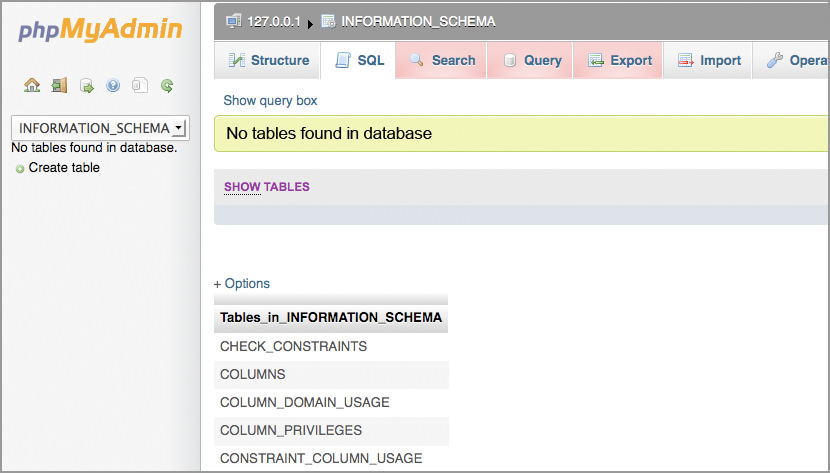
If your phpMyAdmin no longer sees any tables in any of your local databases, that is because permissions change away from mysql.mysql on any database directory under /var/lib/mysql to, say, root.root (most probably).
Long story short, you will have to change the owner from root.root to mysql.mysql, to do this, you’ll need root access and putty. Key in this command.
chown -R mysql.mysql /var/lib/mysql/*This will most probably solve your ‘No Table Found’ problem, it took me much searching and trial and error to resolve this issue, not to mention growing a really long beard while waiting for your web hosting to figure out the problem, let alone replying to you. Cheers.

what about mySQL under windows 7 ?
I’m having this exact problem on my MAMP server but I have no clue how to sort it. Can you explain to me how you change the permissions to mysql.mysql as i’m a super newb. Please explain it as you would to a child ;)
Thanks
Stu
@Stuart – Do you have access to root? Access your server as ‘root’ user and type the command line as shown above. That’s all.
What does that mean? How do you access your server as root user?
Are you using shared hosting, if so, you can’t access via root. If you have your own server or VPS, you can access root via SSH.
It’s ok now, I found an alternative fix! I downloaded a ep plugin called lime export and exported my tables trough wp to an SQL file. Sites now live!
Hi there,
I followerd the instructions (changed the password from ‘root’ to mysql) and now I lost access to MAMP completely.
Please can you help me to fix it and get everything back?
I’m no expert so if you could give me step-by-step instructions it would great…
Thanks!
@Ciskut
I think you’re supposed to change the permission to ‘root’, not the password to ‘root’
Hi see…well now I know!
Thank you GeckoFly for your feedback.
i try to type the command line..
chown -R mysql.mysql /var/lib/mysql/*
but still can’t fixed the priblem..please advise
@jo
Maybe the location of your MySQL is different from mine, I suspect it is not under the directory /var/lib/mysql/
Check with your web hosting company on the directory
Thanks,
I had no mysqldump, only a copy of the files in /var/lib/mysql.
regranting root.root worked for me.
Hi,
When I run SHOW TABLES, Database doesn’t list tables on the right like on your screenshot.
Than means that my tables actually gone somehow?
The thing is we didn’t do anything to the DB.
Have you ever encountered such situation?
Hosting company states they didn’t do anything and we need to contact webmaster.
It is probably because the ‘owner’ or ‘admin’ rights was changed to something else. If you are on a shared hosting, contact them. If you are on a VPS or self-managed hosting, you will have to change the ownership via the commands shown in the article.
what about mySQL under windows 7 ?
Hi.
I´m desperately trying to install WordPress, but keep running into problems. I have installed MAMP on my computer and downloaded wp. In phpMyAdmin is says that No tables can be found, and I can´t open any pages by typing localhost..
Now i wonder if the problem is, that I personally don´t have internet – I use the public internet on the library on my pc.
Does that mean I can not create a website with wordpress at all??
I submitted my work in Google classroom in my class and when I reached home to import tables.tables are not showing. But when I opened MySQL file in vs code there are commands which I used.. please help
I have gone through all the possible solutions and somehow , I got your site which address this issue . My created database through phpmyadmin wasn’t having tables. Now, I got the answer to my question.