

How to improve your laptop’s wireless signal receiving strength and speed? If you happen to own a notebook powered by Intel Wireless Chipset, you are lucky enough to have the ability to boost your laptop’s capability in receiving and sending the wireless signals. Without further ado, here are 4 simple methods to boost your Microsoft Windows and Apple MacBook macOS laptop’s wifi signal and speed.
Continue ➤ 12 Wireless Router Antenna Distance Coverage Comparison
1. Advanced Intel® Wireless Adapter Settings
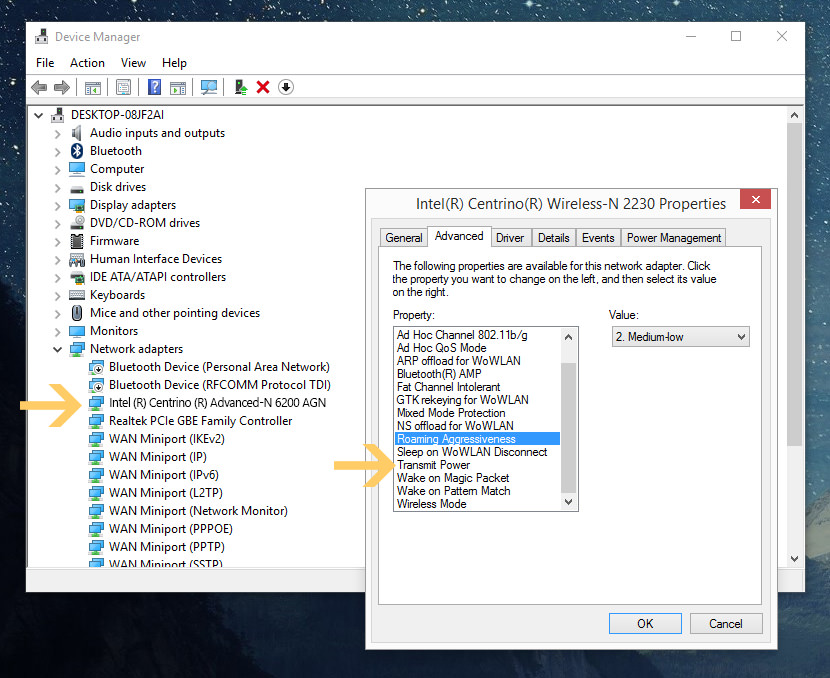
How to speed up wifi connection? Not all Wireless Adapters are the same, there are a number of chipset makers such as Atheros, Qualcomm, Broadcom, Ralink, MediaTek and more. Intel is my favorite Wireless chipset, this is because it comes with a few wireless adapter settings that will boost the signal received by the laptop.
As shown in the screenshot below, with a simple click, you can access the advanced adapter settings and configure settings to meet your wireless networking needs. Here are 4 unique features available for intel WiFi Chipset you should maximize to amplify the signal received from the router.
- Ad-hoc power management – Set power-saving features for device to device (ad-hoc) networks.
- Disabled: Select when connecting to ad-hoc networks with stations that don’t support ad-hoc power management.
- Maximum Power Savings: Select to optimize battery life.
- Noisy Environment: Select when connecting in a noisy environment to prevent performance degradation.
- Roaming aggressiveness – Define how aggressively your Wi-Fi client roams to improve connection to an access point. Click Use default value to balance between not roaming and performance.
- Lowest: Your wireless client won’t roam. Only significant link quality degradation causes it to roam to another access point.
- Medium-Low/Medium-High: Allow roaming.
- Medium: Balanced setting between not roaming and performance.
- Highest: Your Wi-Fi client continuously tracks the link quality. If any degradation occurs, it tries to find and roam to a better access point.
- Transmit power – The optimal setting is to set the transmit power at the lowest possible level still compatible with communication quality. The setting allows the maximum number of wireless devices to operate in dense areas. It reduces interference with other devices that share the radio spectrum. If you decrease the transmit power, you reduce the radio coverage.
- Lowest: Sets the adapter to the lowest transmit power. Increase the number of coverage areas or confine a coverage area. You should reduce the coverage area in high traffic areas to improve overall transmission quality and avoid congestion or interference with other devices.
- Medium-low/Medium/Medium-high: Set by country requirements.
- Highest (Default): Sets the adapter to a maximum transmit power level. Use this setting for maximum performance and range in environments with limited radio devices.
- Throughput Enhancement/Booster – Enhance the transmit throughput by enabling packet bursting. The default setting is Disable. When the Intel Throughput Enhancement feature is enabled, the wireless adapter may transmit using the Short Interframe Space (SIFS) interval between packets instead of waiting for the expiration of the Distributed Coordination Function Interframe Space (DIFS) and additional random back-off time. The shorter wait time results in better throughput of the wireless medium.
2. DIY WiFi Antenna Reception Booster
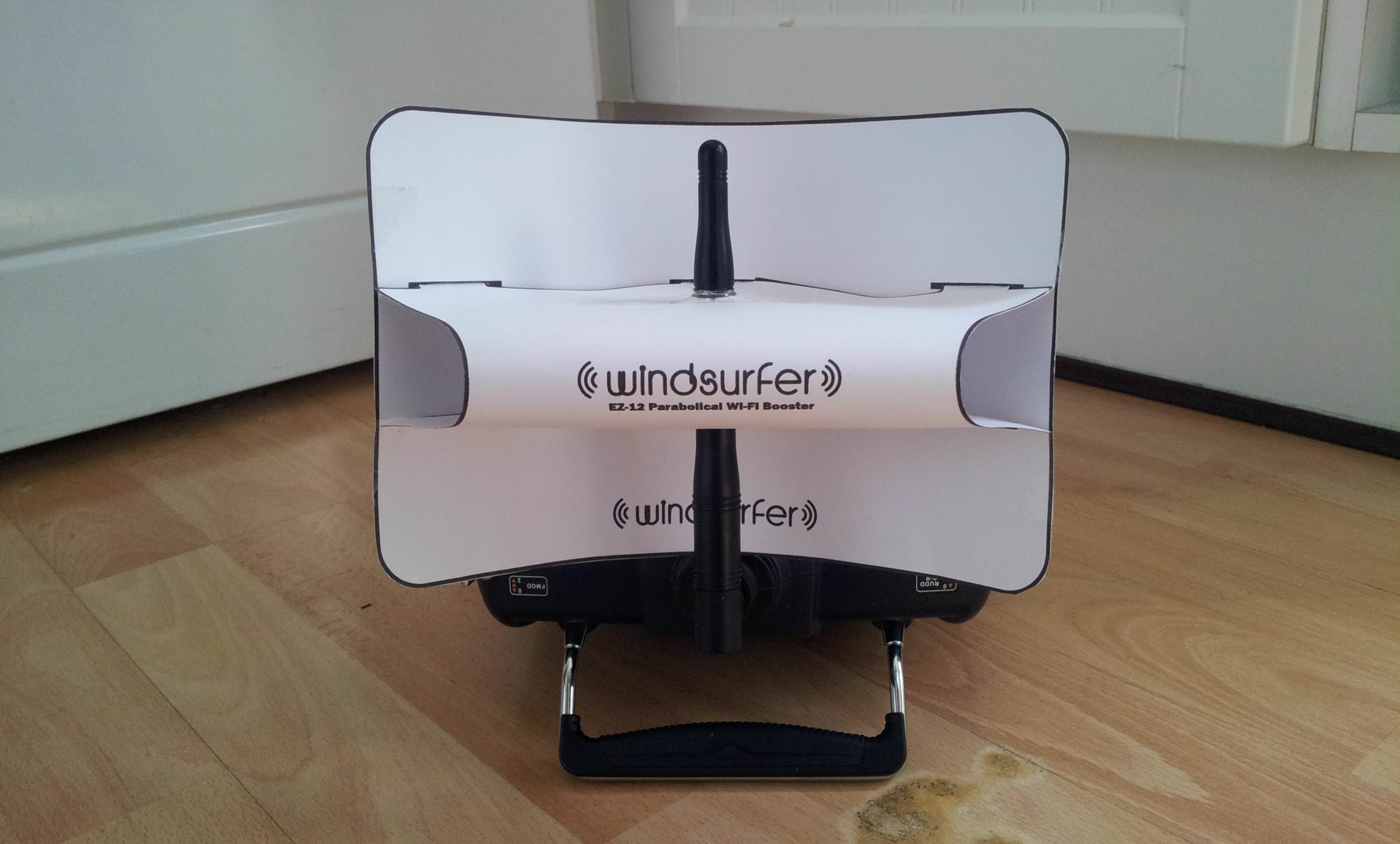
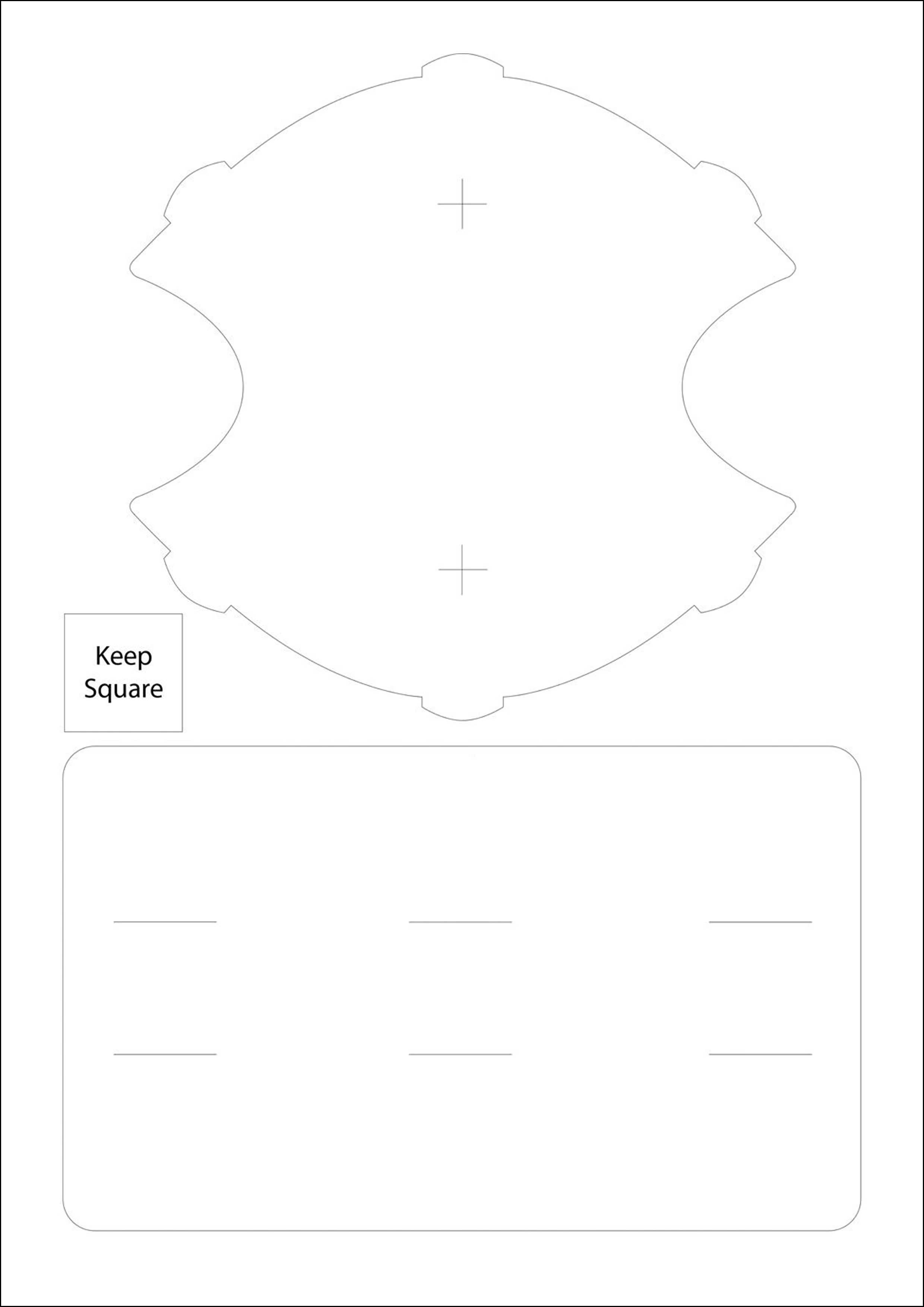
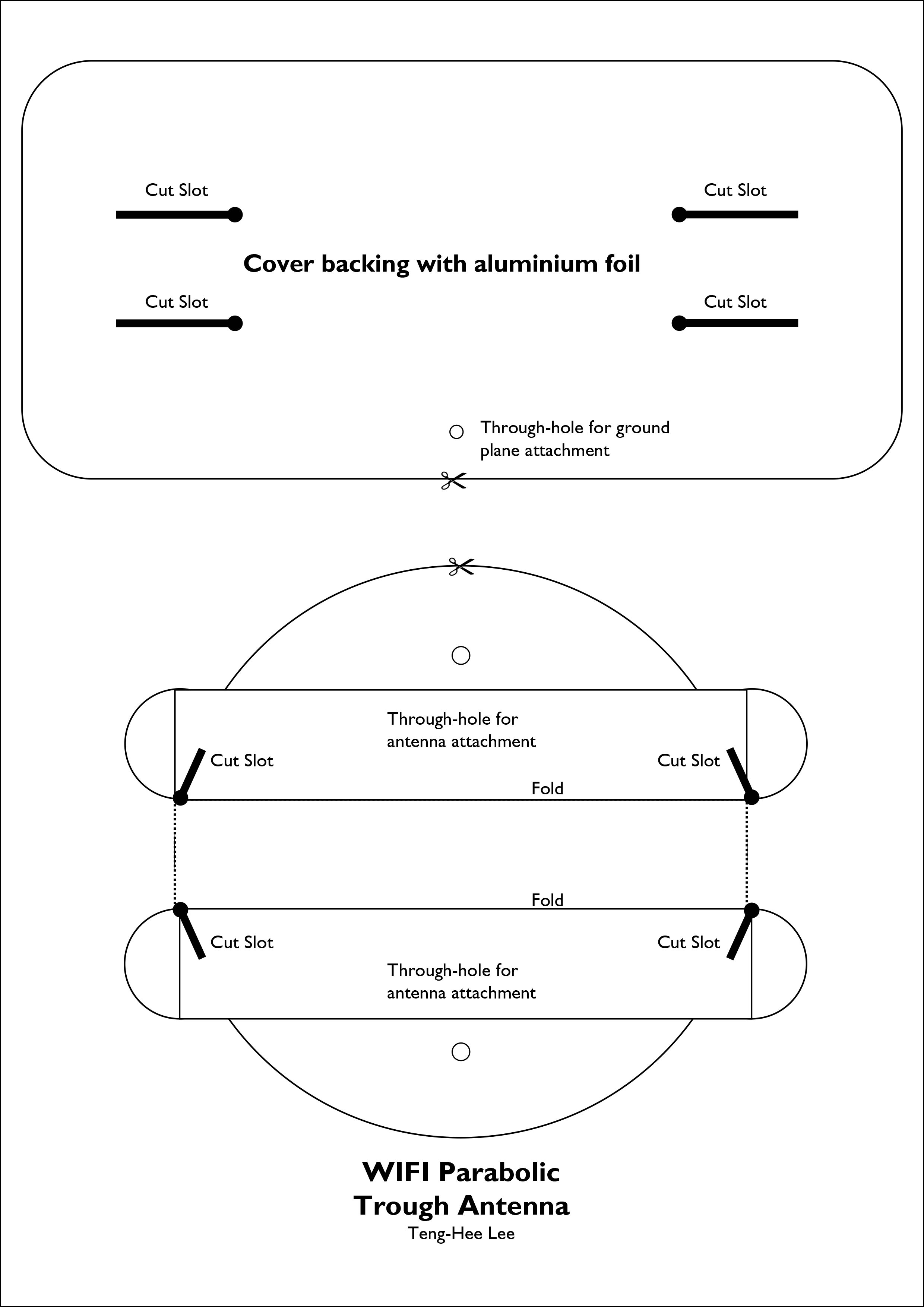
How to improve your internet connection and wifi signal strength? If your laptop doesn’t use an intel wireless chipset, the only way to solve this is to purchase a USB wireless adapter. After researching for days, I could not find any Intel powered Wireless USB Adapter, I suspect this is because the cost is too high or not a favorite among geeks. After all, the best USB Wireless Network Adapter that can be hacked for stealing wifi packets efficiently are powered by Atheros, Ralink, and Realtek Chipsets. With that, you will need to purchase a USB Wireless Network Adapter, download the WindSurfer A4 Size Template and create your own antenna extender.
3. WifiInfoView
Channels are like highways, there are 9 to 13 channels available for public WiFi Wireless usage, certain channels are off limits for military and police usage, thus making the available channels for public usage limited, therefore more congested. If you live in a densely populated area, such as a condominium, chances are your neighbors are tuning into the same channels. The best channel is the least used channel, the only way to find out is to scan all the WiFi signals within your receivable radius. Once identified, you should change the router’s channel to the least used channels within your area. More WiFi channel scanning software here.
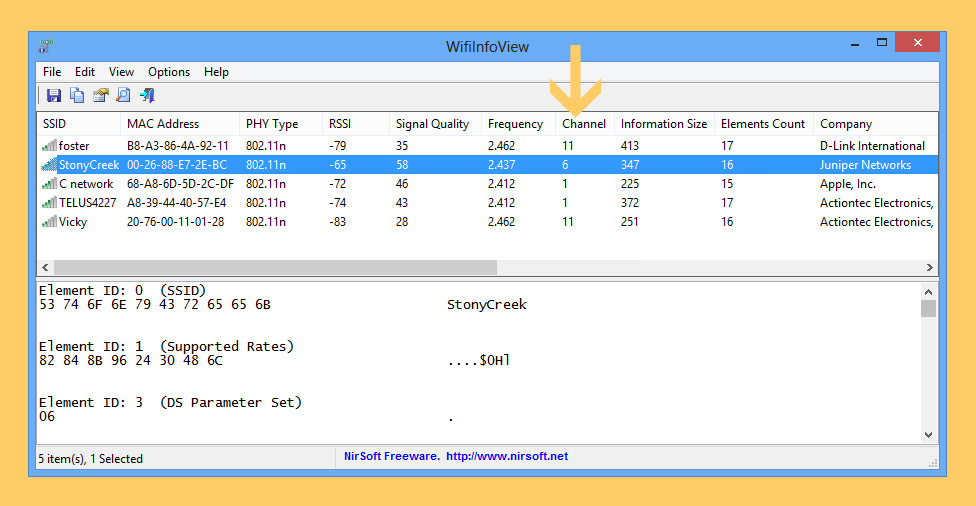
WifiInfoView scans the wireless networks in your area and displays extensive information about them, including: Network Name (SSID), MAC Address, PHY Type (802.11g or 802.11n), RSSI, Signal Quality, Frequency, Channel Number, Maximum Speed, Company Name, Router Modem and Router Name (Only for routers that provides this information), and more.
When you select a wireless network in the upper pane of this tool, the lower pane displays the Wi-Fi information elements received from this device, in hexadecimal format. WifiInfoView also has a summary mode, which displays a summary of all detected wireless networks, grouped by channel number, company that manufactured the router, PHY type, or the maximum speed.
4. Wireless Mouse, Keyboards, Speakers, And Printers
Wireless Mouse, Wireless Speakers, Wireless Keyboards, Wireless Headphones and more can interfere with your wifi signals, if possible, use a wired mouse and keyboards. I experienced this when I purchased a new computer with both wireless mouse and keyboard, initially I thought it was weak batteries or product defect. The problem goes away when I research the channel frequency my Logitech devices use and change the channel for my router, thus avoiding any conflict due to proximity. Yes, I am aware that those are powered by Bluetooth, but the extra noise generated by so many devices on the same channel causes a slow response from the device and high latency.
Want Faster WiFi Connection? Here Are 5 Weirdly Easy Tips
Last but not least, positioning the wireless router is equally important. We’ve been putting their routers in the wrong place this whole time. Wifi signals are made of radio waves that have a shorter wavelength than AM radio and cell phones but longer than satellite tv. How can I make my wifi faster? There are several things you can do to make your wifi faster without paying more, and they mostly have to do with the placement of your wifi router.


Thank you for the information but I have Windows Vista how do I do it with Windows Vista?
Guide Simple tweaks to boost your wireless signal strength
You get a proper PC
Use a Linux distribution instead of Widows Vista
Afnan device manager is always there in every window. I have windows 7 and its working fine with it. However @WRITER please tell me that will it consume more battery or not? Because i keep on changing these settings regularly and check the ping again and again (testing) that what settings works best.
How to Improve WiFi Reception?
how to switch over to these settings in iball baton 300n m external receiver?
How to Improve Low Wireless Signals on Adapters.
BearExtender PC Long Range 802.11n USB WiFi Booster An affordable, adapter that connects via USB to a laptop to extend a 2.4 GHz signal
There is no Throughput Enhancement feature on my Windows 8.1 laptop. What would I do then?
If this feature is not available, try updating the driver. If that doesn’t work, perhaps this feature is only available for intel powered wifi chipset.
Thanx a lot !! :D
How to check at what tx power is Intel WiFi Link 5100 AGN operating ? I am looking for the tx power value but unable to find it under device properties in the device manager.
TX Power features is not available in all intel chips, it depends on the regulation of the country, laptop heat absorbtion capability and etc.
I do not want any such feature. I just need to know the value. In linux giving the command ‘iwconfig wlan0’ displays the value of wireless card’s tx power. How do I find the value in windows if its not shown in device properties?
I’ve tried the “netsh wlan show all” command prompt and it doesn’t display the tx power, neither does intel’s own product brief page says anything – http://www.intel.com/content/www/us/en/wireless-products/wifi-link-5100-brief.html
Sorry, I can’t help you on this matter. Maybe you can run a bootable version of Ubuntu on a USB and run the cmd “iwconfig” to find out the chip’s tax power.
thanks for the information i have been able to set the speed to the highest, but my problem is i can’t locate the ‘Throughput Enhancement’,
i am using
Ralink RT5390R 802.11bgn WiFi adapter
windows 10
pc: hp envy dv6
depending on your Wifi chipset, this feature is available for intel chipset only, not all wifi chipset are made by intel.
my has multimedia/gaming environment, does it in anyway relate to the throughput enhancement?
I tried this for my BenQ RL2755HM Console Gaming Monitor to connect Netgear 1200 AC adapter. But still net is not working in my laptop. What is problem I can’t figure out. If you know please let me know what should I do.
Did this a couple months ago- following step by step, now my internet continuously disconnects and crashes. I did a system restore, worked for a few days but has started again. I work from home and it is affecting my ability to log in and work, i.e my income. My browser keeps saying process isn’t responding. Never had 1 problem before, I just needed to get a stronger signal in my room where I work, which is the furthest room from the router.
My pc isn’t even a year old- mid range Dell.
I admit I am a novice at such things, but trusted if I followed the instructions of someone who does know, it would be ok. I advise if you are also a novice, don’t do this. It has caused frustrating repercussions and I cannot afford to just go buy another pc (still paying on this one!).
Maybe it is time to get a very powerful router.
Looking for this. I am going to try windsurfer antenna.
my pc internet is slow due to many users how can i make it faster
Thanks it Worked…
I had wireless mouse and Key board, now i use wired mouse n key board, so i get faster internet..