

How do you securely delete files in your macOS? Good news, don’t pay for third party software! newer macOS since Leopard comes bundled with the new ‘Secure Empty Trash’ feature. It allows you to permanently delete your files, rendering it unrecoverable.
Related Article 😍💰👉 20 Free Bad Sector, Corrupted, Damaged Hard Disk Data Recovery
However, there is a good reason why this unique feature is not enabled by default, some of the reasons are – it takes a longer time to delete these unwanted files because it needs to overwrite the existing sector, not to mention this method might shorten the hard disk lifespan. Not recommended for the average user, unless you have lots of ‘top secret’ or ‘homemade videos’ you regretted making which need to be deleted forever from your hard disk.
If you think this is a conspiracy, try deleting a file from your computer and use a file recovery software to scan your hard disk. You will be amazed that the software has the ability to recover these ‘deleted’ files. A must have tools for those selling their old Macs.
1. MacClean’s File Eraser
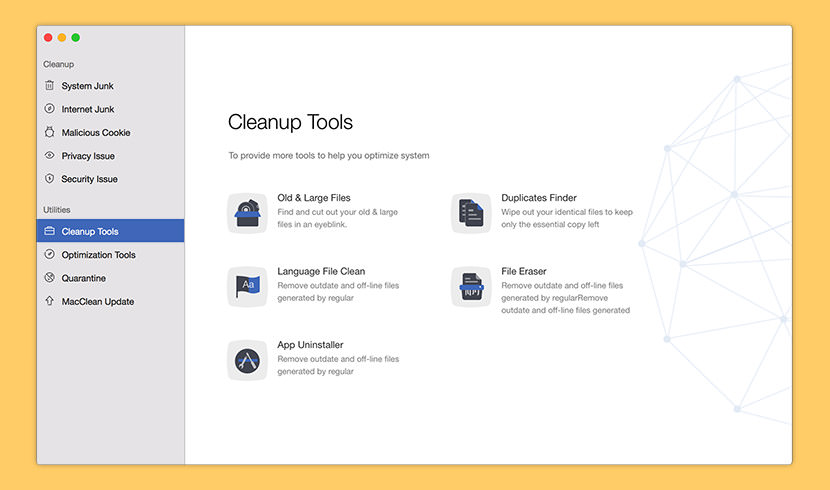
MacClean 3 comes to initiate a new round of spring cleaning on your Mac with great technology and services. In addition to your familiar Mac cleaning and OS system maintaining features, it now arms with privacy and security protections to give you a state-of-the-art Mac experience, still for free.
MacClean File Eraser option enables you to remove outdated or off-line files that may leak your privacies. You can choose an erasure mode on MacClean (Standard Erase, Safe Erase or Top Security Erase) to clean these files securely. Please refer to the detailed guide to make good use of MacClean.
2. FileShredder
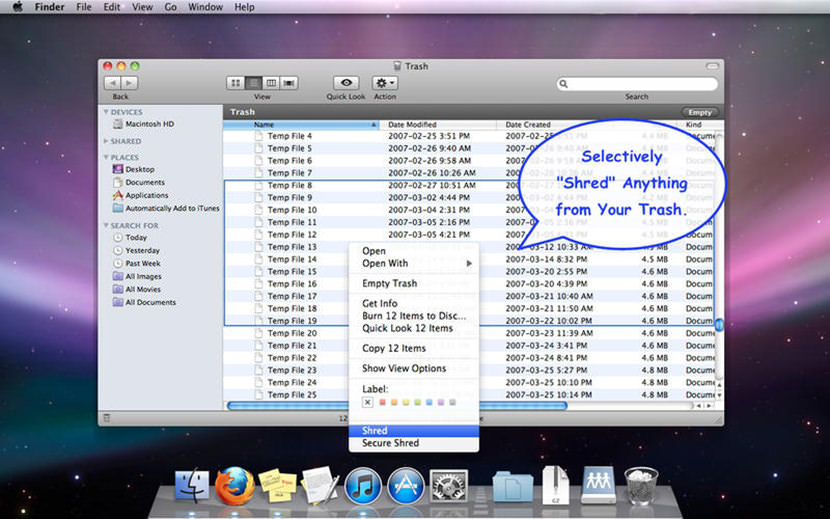
Want to securely delete sensitive documents, or quickly erase large files to free up space from your Mac, USB device, or external drive, without having to empty your entire Trash? FileShredder provides a simple solution for shredding any file right away from your computer. Choose in Preferences one of three algorithms for secure deletion: 1 pass (fastest), 7 DoD-compliant passes, or 35 pass Gutmann deletion (safest).
What is the difference between Shred and Secure Shred? While both options bypass the Trash to permanently delete files from the Mac, Secure Shred also overwrites the data on the hard drive so that it cannot be recovered whatsoever. Shred deletes much faster since it doesn’t overwrite the data on the hard drive, but the files may be recoverable until your computer reuses that space on the hard drive.
3. CleanMyMac 3’s Shredder
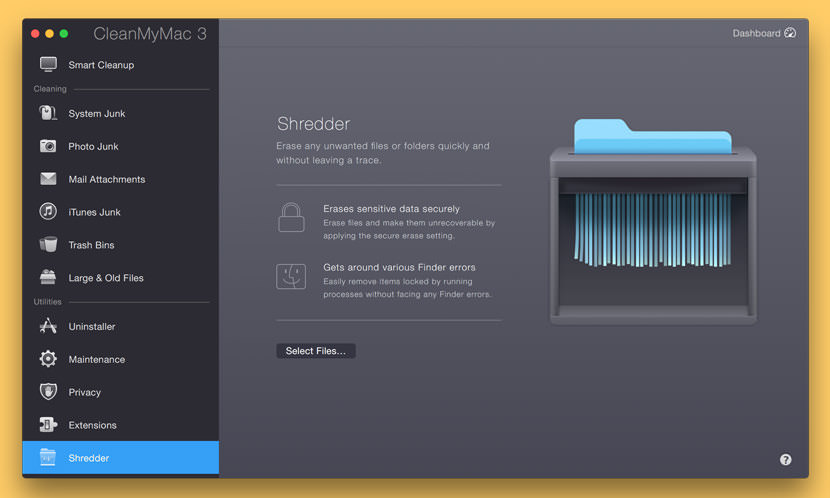
CleanMyMac is a safe, all-in-one Mac cleaner that cleans up apps, data, and gigabytes of other junk. When you use Shredder, you remove data from your Mac without leaving any trace of it behind. Why do I need Shredder? The thing is, when you get rid of a file by emptying the Trash, you’re just removing an access point (icon/directory listing) to the file. It doesn’t erase the data, it discards it. This means that the data itself isn’t actually deleted, making the file recoverable via third-party apps.
Erase files securely with Shredder. This means that the file data isn’t just discarded, but written-over. The access point is removed, and the data is rewritten (read: scrambled), making the file irrecoverable. When you erase something with Shredder, you cannot restore it — it’s a tool for really getting rid of files.
4. Permanent Eraser

When you normally delete your files in macOS, the operating system is only forgetting where those particular files are placed, while the data still physically remains on the drive. Beginning with macOS 10.3, Apple enhanced its security by introducing the Secure Empty Trash feature, which follows the U.S. DoD pattern of overwriting data seven times.
Permanent Eraser provides an even stronger level of security by implementing the Gutmann Method. This utility overwrites your data thirty-five times, scrambles the original file name, and truncates the file size to nothing before Permanent Eraser finally unlinks it from the system. Once your data has been erased, it can no longer be read through traditional means.
Permanent Eraser provides additional wiping methods such as the 3-pass DoE or 35-pass Gutmann algorithms. This utility overwrites your data multiple times, scrambles the original file name, and truncates the file size to nothing before Permanent Eraser finally unlinks it from the system. Once your data has been erased, it can no longer be read through traditional means.
5. ShredIt X
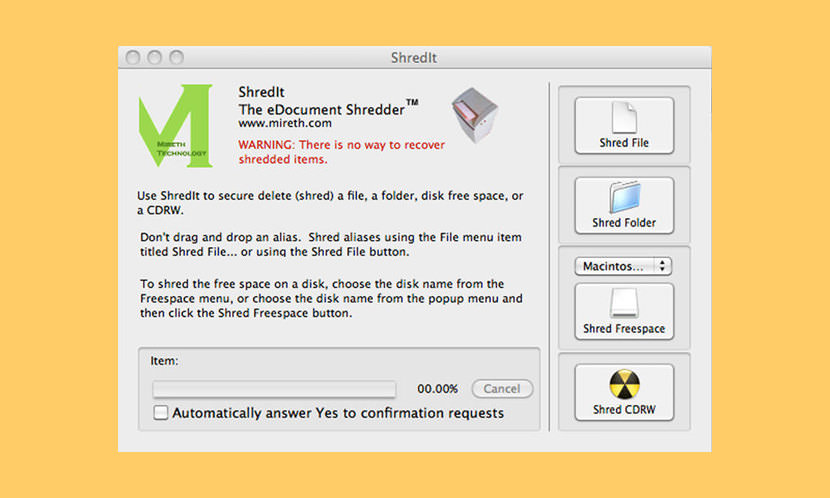
ShredIt X permanently deletes files from your hard disk. Deleted data can be recovered from your computer. Protect your privacy with this easy to use file shredder | hard drive cleaner for macOS that will erase data so it can’t be recovered.
Whether you want to clean a disk or wipe disk free space, ShredIt for macOS is the right security eraser software for the job. Secure Delete files, disk free space, a hard drive, an external drive, a CD-RW and more. It comes with simple instructions, built in safety features, DoD, DoE, NSA, Gutmann standards compliance and online tutorials.
6. DoYourData Super Eraser
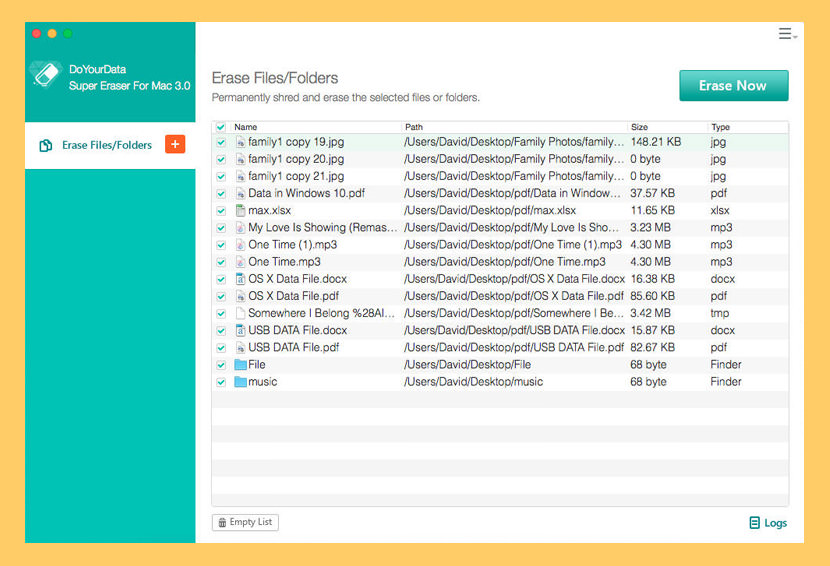
Permanently Erase or Wipe Data on Mac, DoYourData Super Erase for Mac is powerful Mac data erase software that can permanently and completely erase files, folders and data on a Mac hard drive or storage device. It will destroy/wipe the selected data and overwrite the disk space with zeros/ones or random bits. After erasure, the erased data will be lost forever, and can’t be recovered by any data recovery software or service. All file types are supported, such as photos, videos, emails, documents, folders, archives, audio etc.
- Erase Selected Files/Folders under macOS – Selectively and permanently erase selected files or folders from Mac machine or storage media under OS X. You don’t have to wipe the entire hard drive.
- Completely Wipe Mac Hard Drive or Storage Media – Completely and conveniently wipe Mac hard drive or storage device to destroy and erase all existing data, lost data, history data on the hard drive or storage media.
- Securely Wipe Unused Disk Space – One-click to wipe unused disk space on Mac or storage media to permanently erase lost data or traces on the unused disk space. This leads to a cleaner, safer and more efficient hard drive.
- Erasure Methods/Standards – HMG Infosec Standard 5, Baseline, DOD 5220.22-M and U.S. Army AR380-19
7. IOBit MacBooster’s File Eraser

It helps you erase any unwanted files without having them being recoverable. You can drag and drop files here or click the “Add Files” button to safely erase them. After you select the file, please click the Erase button in the bottom center part of the window. It will be erased without leaving any trace. Important files with your personal or financial information can be hijacked even if you delete them from your Mac. File eraser is a more secure way to toss your files, and it makes your deleted files completely unrecoverable.
8. Stellar Wipe Mac
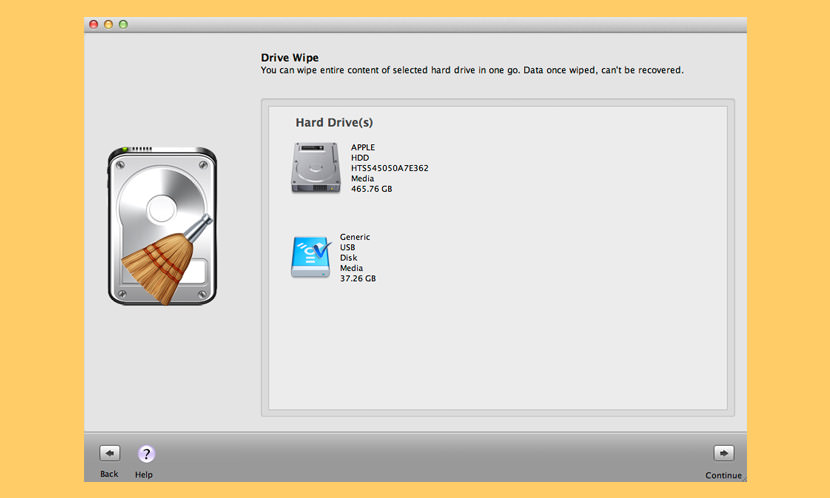
[ Not Free Anymore ] Permanently wipes unwanted sensitive data from any macOS based hard drive. File eraser Mac utility to wipe selected files, folders or data from the entire hard drive on macOS. The software contains powerful wiping algorithms in it and ensures permanent erasing of data, beyond the scope of data recovery.
- Wipes Hard Drive – This Mac hard disk eraser software can help you wipe your entire Mac hard drive in a single step. The software includes powerful as well as fast wiping algorithms that erase unwanted data from the hard drive permanently.
- Wipes Files and Folders – The software completely erases unwanted files and folders that contain sensitive data. You can select any file or folder from the system and wipe it permanently, beyond the scope of any data recovery software.
- Wipes Internet Browsing Information – With this file remover Mac utility, you can erase sensitive Internet browsing data stored in the form of temporary Internet files, cookies, user sessions etc. The software wipes all browsing information from all major web browsers, including Firefox, Internet Explorer, Google Chrome, Opera, Safari, Adobe Flash Player, Camino, Omniweb, iCab, Navigator.
- Wipes Free Space – The software ensures complete erasing of data from your hard drive by wiping free space, from where sensitive data may have been deleted in the past. By erasing even free space of the drive, the software helps in avoiding any chance of deleted data recovery.
- Wipes Instant Messaging Information – With this File remover Mac utility, you can wipe all information (login time, logout time, messages-sent/received etc.) related to your chat messengers. The software supports a number of premiere Instant messengers, including Skype, Yahoo Messenger, iChat, AIM, Microsoft Messenger, Adium, aMSN, ICQ, Proteus, and Fire.
- Wipes Recent File Histories – This data eraser Mac utility helps in protecting the privacy of your file from unauthorized-access by wiping all recent file histories. The software erases file histories as well as other related information stored by various applications. Stellar Wipe erases file open histories from Disk Utility, All Applications, iPhoto, iTunes, Quick Time, Finder, VLC etc.
9. Mac Optimizer Pro’s File Shredder
[ Discontinued ] Mac Optimizer Pro’s File Shredder protects your privacy and data security, they understand, and therefore Mac Optimizer Pro offers military-grade data shredder powered by multiple-overwrite technology to ensure your sensitive, private or unwanted data; once deleted, will never be restored by any existing technology. Breathe easy!
10. Sunyouth File Shredder
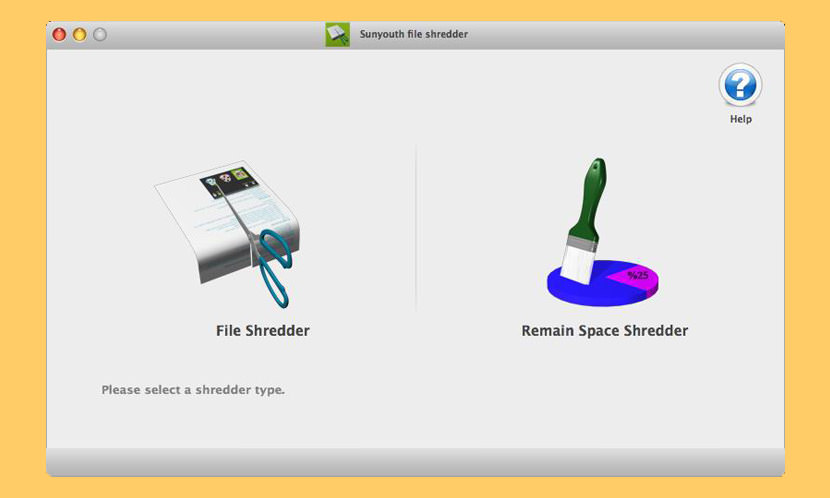
[ Discontinued ] Maybe you don’t know, when you move data in a MAC to the Trash, and empty the entire Trash, they might still can pass some data recovery software to recover and restore; Maybe you don’t know, your SD card, USB, mobile disk storage device such as the data is moved to the Trash, and empty the entire Trash, they might still can pass some data recovery software to recover and restore; Maybe you don’t know, in your MAC disk partition, or SD card, USB, mobile disk storage devices and so on in the remaining space may still can be recovered through some data recovery software you have deleted data.
Dear, when one day, you want to sell your old MAC computers, mobile disk, etc., have you ever thought about, there’s your important data? You should n’t want to let your secret leaked? You should n’t want to encounter the picture “scandal” ? Sunyouth File Shredder is your best choice, it can help you shred that you want shred of data, it can help you shred the free space in the disk that can be recovered through some data recovery software.
11. Incinerator
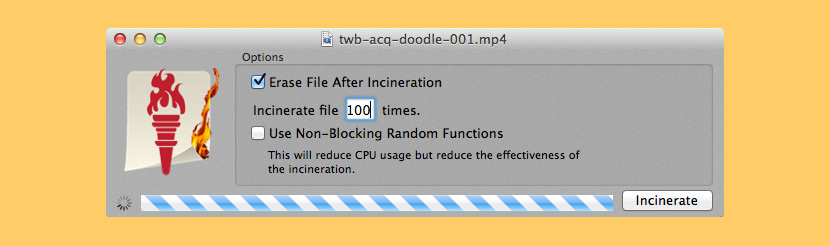
[ Discontinued ] Do you have files that are sensitive? Do you have documents that must remain away from prying eyes? Well, you should know that when you normally erase a file on your Mac, the file can sometimes still be retrieved. Avoid this problem by using Incinerator, a secure file eraser.
Like a paper file shredder in your home or office, Incinerator renders files unreadable before permanently erasing them; using a special technique, Incinerator can write over every byte of your file before erasing it so anybody who digs through your hard drive for deleted data and finds your file won’t be able to open it.
12. File Shredder
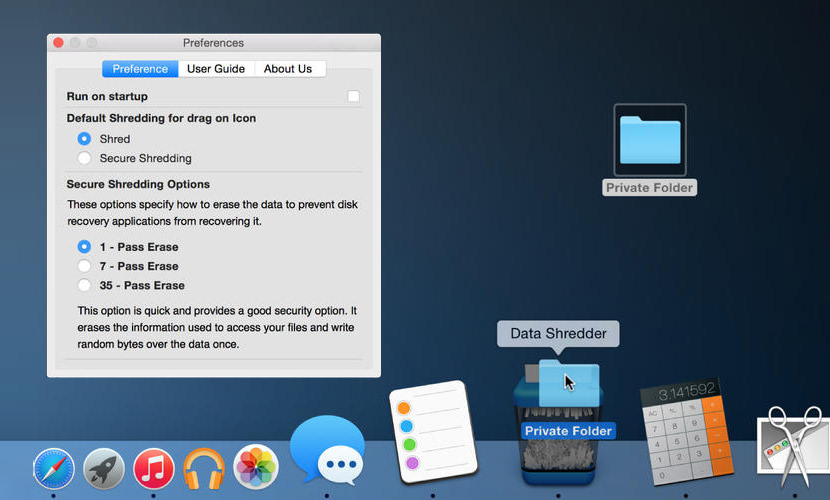
[ Discontinued ] Permanently shred files & folders from your system to keep information secure and impossible for anyone to retrieve. Optional Shredding Methods;
- 1 Pass Erase – This option is quick and provides a good security option. It erases the information used to access your files and write random bytes over the data once.
- 7 Pass Erase – This option takes 8 times longer than”1 Pass Erase” and provides a better security option. It erases the information used to access your files and write over data 7 times based on US Department of Defence (DoD) 5220-20 M standard algorithms.
- 35 Pass Erase – This option takes 35 times longer than “1 Pass Erase” and provides the best security option. It erases the information used to access your files and writes over the data 35 times based on the Gutmann method for deletion.
Video Tutorial on Securely Empty Trash on an Apple Mac
This tutorial shows you how to securely empty the trash on a Mac computer.



This brief help item does not say whether “Secure Delete Trash” can be used only on some of the files in Trash and not automatically on everything. It will be too late to find out after everything has been securely deleted.
Secure Empty Trash can take a while if you’re deleting large files
Sometimes the Trash on your Mac won’t empty – even when you tell it to.
I’ve ran across a few people who have upgraded their Macs to Lion and are having trouble emptying the trash!
Trash not deleting files problem
Does “Secure Empty Trash” securely delete the hidden version files
You can enable secure empty trash as the default from the Finder preferences
You say attempts to empty your Mac’s trash fail with an arcane error?
How to Recover Deleted Files on Mac Os X with Stellar Phoenix
anyone tried recovering files deleted via the secure empty trash feature? can i use undelete 3rd party software?
Recovering Deleted Files From Secure Empty Trash?
Ive tried several apps. The Free applications ask for registration after one system scan or even clicking one of the functions.
I am missing SecureRemove in the list.
https://www.secureremove.com
As of 2017 many of these apps don’t exist in AppStore/iTunes. What was the date of the ORIGINAL article?
Maybe the author of the app doesn’t see a need to submit their apps to AppStore/iTunes? All the above links work perfectly. I always monitor for broken links, just download from the author’s website.
Most of these software manufacturers are either in India, China or Russia. No offense, but there is no way in HELL I am going to install ANYTHING on my machine IF I want maintain any type of security to my data.
There is NOTHING to show that their work doesn’t have other hidden features. For instance – file transfers while you wait.
You are NOT a business in China unless you are willing to help the government when they want it. There is NOTHING that does not reassure me there is not a ‘back door’ to these programs or simply an SSL transfer from my machine directly to China, India or Russia.
I can’t trust the developers, the management, the governments nor the integrity of these programs based on the ‘free market’ for hacking outside of the USA.
Maybe in 30 years we can start to trust it, but not today.
Thanks for sharing all the information on how to permanently delete files from the Mac OS . My only query is , is there any recovery tool to make sure that no file can now be recovered once deleted from Mac ?
A hammer like what Hillary Clinton used.
I’ve just used DoYourData Super Eraser in trial mode to delete a big file. It started deleting well but at the end it said the operation failed and I had to log in to see what happened (I dont have an acc to do that).
The file remained in my computer , but the archives inside vanished.
Does that mean the operation was completed, despide the warning massage before? (“The operation failed”).
I want to be sure they did
How old is this original article? A good question
Another question might be why no mention anywhere in this article of SSDs (which many if not all new Macs ship with in recent years). According to what I read elsewhere (I will be happy to be corrected) it is not possible to securely erase files or folders from SSD because of the way the information is stored in the first instance. So, therefore, all of these applications would appear to be a complete waste of time and money. As I say, I’ll be happy to hear from anyone who can prove otherwise.
I’ve recovered deleted files from USB flash drives, there is no difference between how SSD and HDD stores data
The File Shredder software for Mac you mentioned in this post seem good! What I use is iMyMac Mac Cleaner, alongside erasing secret files to protect my privacy, it also cleans my system junk files, removes unneeded apps on my Mac and does other things to speed up my Mac.
@Ngan – There is a big difference in how SSD’s and HDD’s store data. SSD’s use wear leveling algorithms at the very low level, below where OS’s have control. Yes, you can recover data, but if you’re looking to shred your free space, guaranteeing everything’s been overwritten is another matter.
@Kevin – I agree it should have been mentioned: it is a big question, and I believe not all software actually deals with it properly. From what I read recently, encrypting the drive should write random data to the whole SSD, but doesn’t include multiple passes etc.. I don’t know whether changing the key gets it to rewrite the drive. Equally, I don’t know whether multiple passes are relevant in the same way for SSD’s as they are for HDD’s.
I’ve been a paid CCleaner user for well over a decade. I’ve never had a bad word to say about this program, working with Windows or Mac OS X.
It holds all the bells and whistles mentioned in others’ comments, is fairly easy to navigate, and can be downloaded and used as a trial, free or paid.
Hope this helps.
I have been using FoneDog PowerMyMac, which is also working to clear junk files and unnecessary apps on my Mac. It works just great! It also has some other features to keep my Mac working well. It costs a little but works as good as the expensive ones. So I strongly recommend it.