

MODI (Microsoft Office Document Imaging) was dropped in Office 2007, similar feature can be found in Microsoft OneNote. I bet once in a while you have this great article from a book or newspaper that you wanted to digitally archive it for personal use but you’re too lazy to type it word by word, and as usual OCR software that scans images and convert them to text are expensive, very expensive considering the fact that you’re going to use it once in a blue moon.
See More ▼ 4 Free OCR Apps – Scan And Convert To Text With Smartphones
Most computers or shall I say almost every computer comes with Microsoft Office, and the best part is it comes with a free OCR software, I’ve tried a few Free OCR for example Simple OCR but it simpy doesn’t works as good as Kofax Omnipage but since I left my original CD back home, somewhere far far away, I have decided to give Microsoft Office Free OCR a try and to my surprise it is somewhat on par with Omnipage, not as accurate but why pay for something that you are not going to use often, and why search for Omnipage crack or keygen when you have a free OCR software sitting in your comp.
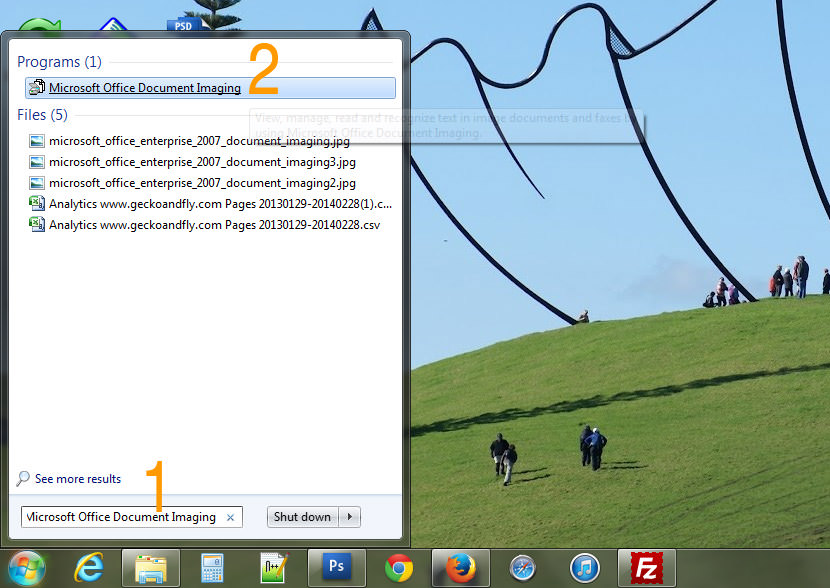
- Step 1 – Search for ‘Microsoft Office Document Imaging’, if this feature is not found, you will have to install it. Here is a tutorial on how to install Microsoft Office Document Imaging.
- Step 2 – If this feature is installed, click on the link as shown.
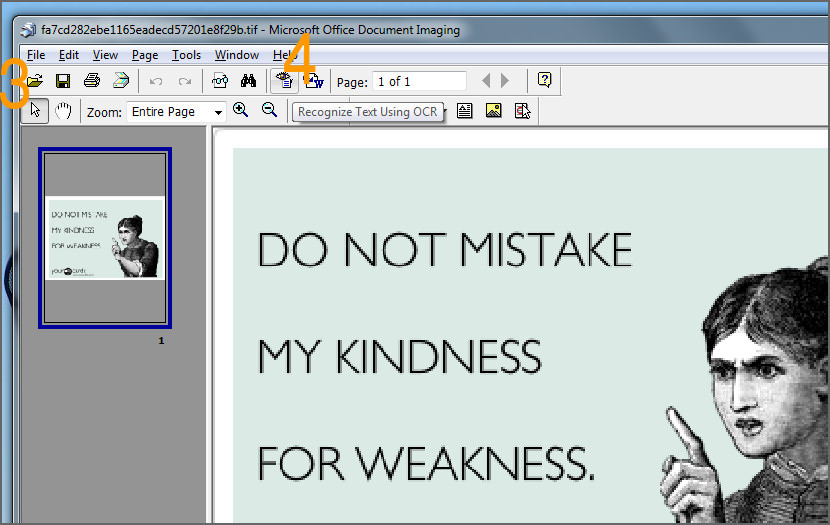
- Step 3 – Open an image file, to open Jpeg, go to ‘File’ > ‘Import’. By default, it only accepts MDI and TIFF format.
- Step 4 – To convert, click on the ‘Recognize Text Using OCR’ button.
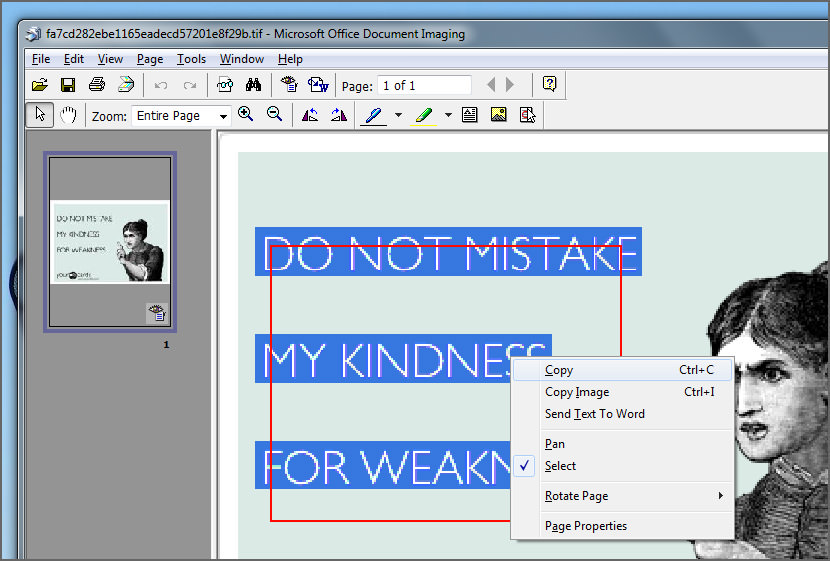
When you are done, you will be able to select the text by double clicking on the text on the image. There you go, a free OCR software that comes bundled with Microsoft Office, why pay for Omnipage Ultimate when it is available for free in Microsoft Office? Spread the word!
A Simple Comparison on Existing OCR Features
OmniPage | Presto! | Microsoft | PDF | Adobe | ABBYY | |
|---|---|---|---|---|---|---|
| Price | $149.99 | $89.95 | Free | $79.99 | $299.00 | $143.99 |
| Retains Layout | ✓ | ✓ | ✓ | ✓ | ✓ | |
| Retains Font | ✓ | ✓ | ✓ | ✓ | ✓ | |
| Formats into Searchable PDF | ✓ | ✓ | ✓ | ✓ | ✓ | |
| Spell Checker | ✓ | ✓ | ||||
| Converts Tables | ✓ | ✓ | ✓ | |||
| Languages Recognized | 120 | 40 | 52 | 184 | 60 | 198 |
| Windows | ✓ | ✓ | ✓ | ✓ | ✓ | ✓ |
| Mac OS X | ✓ | ✓ | ✓ |




Thank you for your comment. Problem is I have not got MODI under the folder indicated. I can see picture manager but not MODI. (Vista, MS Offices 2007)
i am using office 2003, it could either this feature exist only for the professional edition or you might not have installed the full version.
do you have omnipage free download full version? where can i download?
Thanks for the info .. I didn’t realise this was on 2003 pro. Can’t find my omnipro cd so this is coming in handy :)
Thanks for the help . I have checked it out and it works. My own Omnipage is corruprt and I do not wish to purchase very expensive software for the occasional OCR job. hanks again
Correct me if I’m wrong, but I seriously doubt this Imaging software comes free.. I daresay it is a supplement to the Office Bundle, which is not free at all.
As of yet I have not seen anything free coming from Microsoft and I’m not counting on it.
Mind you that your computer probably costed like 100-300 bucks more just for Microsoft products (kind of guessing that number). Why settle for that when you could have OpenOffice and a very nice OS for free from the internet..
Pardon me going a bit off trac on the end there :)
Nice to know they have included an OCR anyway.
OCR & Conversion Solution
wow.. didn’t note the date on the post :p
well, Microsoft is timeless…
Microsoft Document Scanning works! I forgot completely about this software that came with Microsoft 2007 Office Ultimate that I purchased until today when I was looking for a free document scanning software on the internet. I had used Textbridge for the past 8 years with many versions of Windows OS and I was not willing to buy another expensive scanning software. It worked some good degree of accuracy.
A word for those who don’t have or use Microsoft Office, and need ocr. Here’s an online service that does the same job
this invaluable advice. please put a paypal account link on your site so we can donate to you. $1 here and there for your smart smart posting. Why pay for expensice OCR
The OmniPage Cloud Service offers a modest set of APIs
OmniPage Pro X for Macintosh
The OmniPage Capture Software Development Kit (SDK)
great help. thank you very much.
Download OmniPage Professional free
Nuance, ScanSoft, OmniPage, PaperPort, True Page, Direct OCR, Logical Form
How to use a scanner of Canon PIXMA MX 300 with OmniPage OCR 11 or 15 easily? I have office 2007 not 2003, I might be able to buy the student version of office 2010 if needed. I have both OCR OmniPage Pro 11 and 15 (2005 issue that I have not used for many years).
Hello,
I have activited OCR on my PC and I was tring to import my file which is pdf to copy the text, but its gave massage saying microsoft office document imaging can not import my file.
THANS
I find out that it is not possible to install OCR if using a 64 bit OS.
According to MS the driver is not installed in Office 2007
but can be obtained if upgraded to 2010
OmniPage Professional 18 is the fastest, most precise way to convert paper
MODI (Microsoft Office Document Imaging) was dropped in Office 2007; i.e., it has not been available since Office 2007. This article’s author never bothered to mention WHICH version of MS Office that he has. Must be Office 2007, or older. and note which MS Office versions are listed. You can snag MODI back by installing a 2007, or earlier, component of Office; see:
https://support.microsoft.com/en-us/help/982760/install-modi-for-use-with-microsoft-office-2010
Unlike what torrent says, Omnipage is not free. It costs $149. His name indicates he steals warez or cracked software. This article is not about how to steal software.
This article claims an update in March 1, 2014, and says OneNote costs $79. Not true anymore. Microsoft started giving it away for free around March 17, 2014. Go to http://www.onenote.com/. It just converts to text. No formatting is retained. It is very fast.
Hi vanguard, sorry for the errors. I updated the images, not the content and tables. will correct it. thanks for the info.