

There are plenty of tutorials available online on how to set up Gmail IMAP Server for Thunderbird, Outlook, Apple Mail and all the other mobile devices. I’m not going to repeat these tutorials, what I am going to discuss today are common errors in setting up your Gmail IMAP server.
See More ▼ 6 Best Email Clients For Windows – Free Outlook Mail Alternatives
Enable IMAP/POP in Gmail Settings :
One of the many common errors or mistakes in setting up IMAP access for your Gmail is not enabling the POP/IMAP feature in Gmail itself.
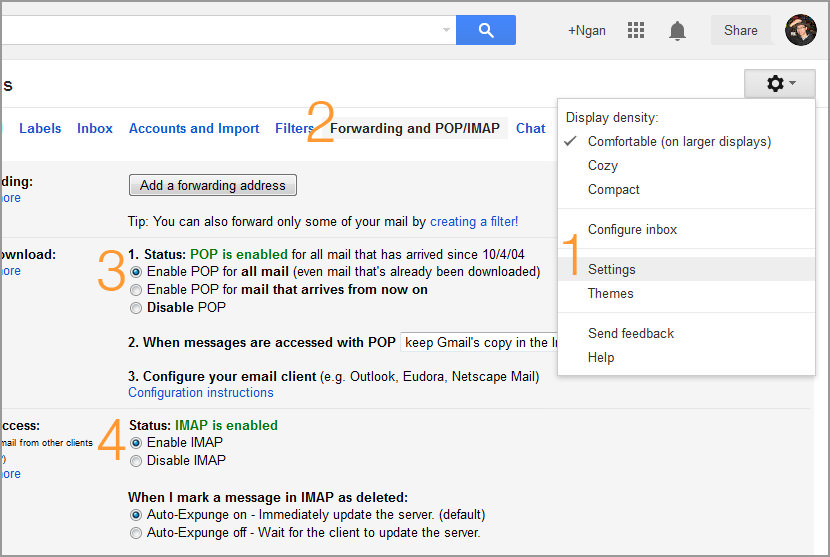
- Step 1 – Click on the ‘Nut’ button, go to ‘Settings’
- Step 2 – Click on the ‘Forwarding and POP/IMAP’ tab
- Step 3 – Select ‘Enable POP for all mail (even mail that’s already been downloaded)’
- Step 4 – Select ‘Enable IMAP’
IMAP SSL and Port
To have your Outlook accessing Gmail via IMAP/POP, you need to enable secure connection (SSL) in your email client. The default non secure port is 143 or 465 (depending on the email client) and is not compatible with Gmail; change the port settings to 993.
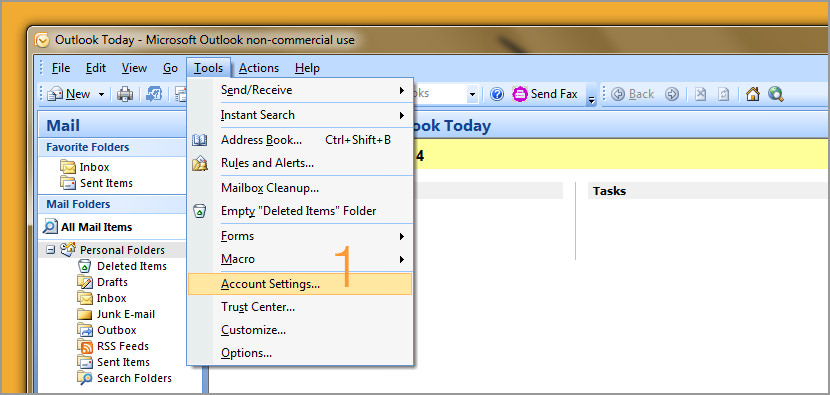
- Step 1 – Go to ‘Tools’, select ‘ Account Settings’
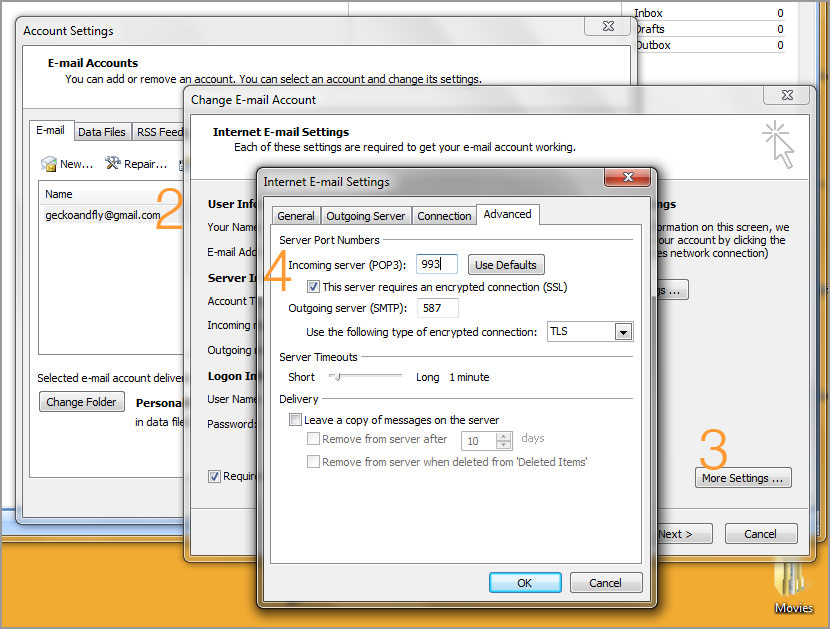
- Step 2 – Double click on your email
- Step 3 – Click on the ‘More Settings’ button
- Step 4 – Check the SSL checkbox and change the port settings to 993.
Why Use IMAP access?
Why IMAP instead of POP? Well, IMAP access enables your mailbox to be synced automatically and it is up to date at all times, unlike POP where you have to click on the ‘Update’ button.
How To Setup Gmail IMAP Server Access :
Mail Clients supported:
- Outlook Express (Windows)
- Outlook 2003 (Windows)
- Outlook 2007 (Windows)
- Outlook 2013 (Windows)
- Apple Mail 2
- Apple Mail 3 (Leopard)
- Windows Mail
- Thunderbird 2
Mobile Devices supported:
- Google Android
- Apple iPhone iOS
- BlackBerry
- Symbian
- Microsoft Windows Phone 8
- Windows Mobile 5
- Windows Mobile 6
- SnapperMail
Setup Outlook Express to Work with Gmail
During this Microsoft Outlook 2013 training video, discover how to set up your Gmail and domain type email account manually to use with Outlook 2013.




Turn on imap, and also sync contacts and calendar items from a Windows Mobile based mobile phone via activesync on the device. Very useful features those.
POP and IMAP access are free for all Gmail users
How can i setup my gmail forwarding to my nokia phone
bagai mana cara aktifkan pop imap di hp se Z530i mohon bantuannya
How can i setup my gmail forwarding to my nokia N73 phone
993 is IMAP port (SSL)
995 is POP port (SSL)
secure smtp ports are
465 (STARTTLS)
587 (SSL)
how to forward outlook server to use thunderbird?
I have been trying to setup my thunderbird and my imap have not been working
how can i my email account setup in samsung monte
ou can access your Gmail account directly via POP using any email client
Thanks for this post! I see you used a gmail account. I really love gmail because its free yet it provides options not available to other email providers – the IMAP and POP3. It is useful to setup webmails in MS Outlook. It cuts off lots of hassle.
Why enable POP3 and IMAP at the same time? Is this because some clients don’t support IMAP?
how can i my email account setup in Thunderbird
Nice article. Gmail setup in outlook
Beginners guide to IMAP vs. PoP
Why IMAP is better than POP?
Set up a new account with your access data in an IMAP-capable program such as Mozilla Thunderbird, Outlook Express, Outlook or Eudora at the remote computer
When I try to set up an imap mail account, iOS 6 automatically sets up a pop3 mail account.
Setting up Gmail in Outlook 2013 using IMAP is almost the same as for POP3
To configure Thunderbird to work with Gmail, first enable IMAP on your Gmail account.
How To Restart Sendmail After Editing Your Configuration Files.
Currently V tech-squad provides support services to consumers and small businesses in
United States. Click the Advanced tab and enter ‘587’ in the Outgoing server (SMTP) box.
Hey, thanks. The video made it easy for me to understand. This worked on 2007 version also, the only difference was instead of “File”, you need to click on Tools and then Account settings, rest I found the same. Thumbs up.
I have (and need to have) 3 email addresses.
With POP all three come into the same Outlook “default” inbox.
But if I use IMAP, the Outlook “default” inbox remains empty and
each email address will have its own separate in box and set of folders.
Unlike the Android email client, Outlook has no “combined” inbox where you can view all inboxes at once.